

Custom Origin HTTP Request Headers
The Custom Origin HTTP Request Headers feature allows you to rewrite HTTP header fields in requests forwarded from Security CDN (SCDN) edge nodes to the origin. This enables you to attach specific request parameters to meet customized business needs.
What is an Origin Request?
When a user accesses a resource that is not cached at the edge node, the node forwards the request to the origin server. This forwarded request is known as an origin request.
Notes:
- This feature only affects origin requests from Security CDN edge nodes, and does not affect responses directly returned to the client by edge nodes.
Origin Request Header Fields
| Header | Description | Matching Rules |
|---|---|---|
| X-Real-port | The source port used by the client when initiating the request. | $remote_port |
| X-Request-Id | A unique identifier for the request, used for tracing and log correlation. | $request_id |
| X-Req-Start-Time | The timestamp when the Security CDN edge node started processing the request. | $request_start_time |
| Client-Ip | The client’s real IP address. | $remote_addr |
| Client-Scheme | The protocol type used by the client request, such as HTTP or HTTPS. | $scheme |
| X-Request-Method | The HTTP method used by the client to initiate the request, such as GET or POST. | $request_method |
| X-Request-Uri | The full URI path of the client request. | $request_uri |
| X-Country-Code | The client’s country ISO code (e.g., CN, US). | $geoip_country_code |
| X-Country-Name | The full name of the client’s country (e.g., China, United States). | $geoip_country_name |
| X-City | The name of the city from which the client request originated. | $geoip_city |
| Accept-Encoding | Indicates the content encoding types supported by the client browser. | Custom value: 1–1000 characters, no Chinese |
| Accept-Language | Specifies the natural languages the client can understand and their preference order. | Custom value: 1–1000 characters, no Chinese |
| User-Agent | Identifies the client’s OS and version, CPU type, browser and version, rendering engine, language, and plugins. | Custom value: 1–1000 characters, no Chinese |
| Content-Type | Specifies the media type and character encoding of the request body. | Custom value: 1–1000 characters, no Chinese |
| Access-Control-Expose-Headers | Indicates which response headers are accessible to scripts running in the browser during cross-origin requests. | Custom value: 1–1000 characters, no Chinese |
| Custom | Supports custom request headers beyond the predefined ones. | Header name: 1–100 characters, llowed characters are letters, digits, hyphens (-), and underscores (_); no Chinese Value: 1–1000 characters, no Chinese |
Unsupported Standard Headers
The following standard headers are not supported for modification in origin HTTP requests:
| www-authenticate | age | pragma |
|---|---|---|
| early-data | save-data | etag |
| if-unmodified-since | accept | access-control-allow-origin |
| origin | content-disposition | content-language |
| x-forwarded-proto | referer-policy | range |
| cross-origin-opener-policy | expect-ct | x-content-type-options |
| x-powered-by | sec-fetch-site | last-event-id |
| report-to | sec-websocket-key | sec-websocket-version |
| date | retry-after | service-worker-allowed |
| x-firefox-spdy | x-ua-compatible | authorization |
| cache-control | warning | content-dpr |
| viewport-width | if-match | vary |
| accept-charset | access-control-max-age | access-control-allow-credentials |
| timing-allow-origin | content-length | content-location |
| via | allow | if-range |
| cross-origin-resource-policy | feature-policy | x-download-options |
| x-xss-protection | sec-fetch-mode | nel |
| transfer-encoding | sec-websocket-extensions | accept-push-policy |
| large-allocation | signature | sourcemap |
| x-pingback | max-age | proxy-authenticate |
| clear-site-data | accept-ch | dpr |
| width | if-none-match | connection |
| expect | access-control-allow-headers | access-control-request-headers |
| dnt | forwarded | from |
| server | content-range | content-security-policy |
| strict-transport-security | x-frame-options(xfo) | public-key-pins |
| sec-fetch-user | ping-from | te |
| sec-websocket-accept | accept-signature | link |
| signed-headers | upgrade | x-requested-with |
| proxy-authorization | expires | accept-ch-lifetime |
| device-memory | last-modified | if-modified-since |
| keep-alive | max-forwards | access-control-allow-methods |
| access-control-request-method | tk | content-encoding |
| x-forwarded-host | host | accept-ranges |
| cross-origin-embedder-policy | content-security-policy-report-only | upgrade-insecure-requests |
| x-permitted-cross-domain-policies | public-key-pins-report-only | sec-fetch-dest |
| ping-to | trailer | sec-websocket-protocol |
| alt-svc | push-policy | server-timing |
| x-dns-prefetch-control | x-robots-tag |
Configuration Guide
Log in to the Security CDN Console.
In the left navigation bar, go to Speed & Cache > Acceleration to enter the Global Acceleration Policy page.
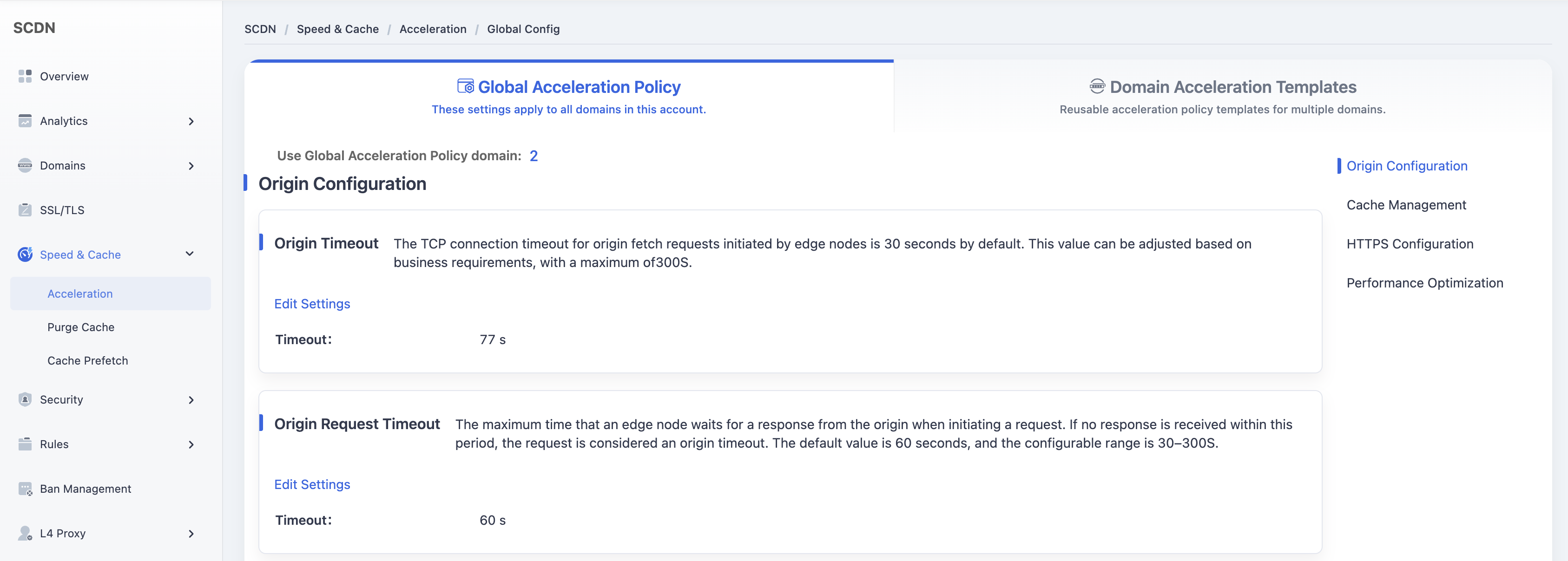
Click the Domain Acceleration Template tab at the top to switch to the template management page.
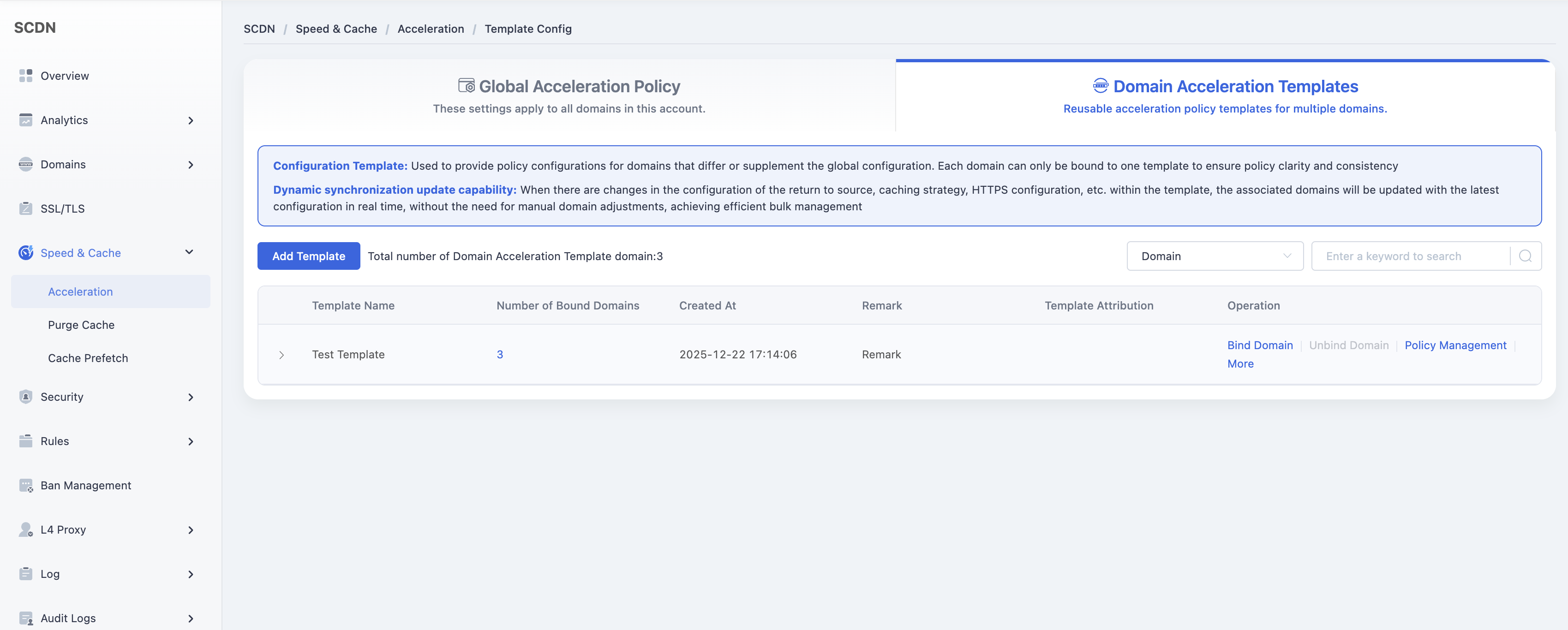
In the template list, find the template you want to configure and click Policy Management in the Actions column.
Scroll down to the Origin Configuration - Custom Origin HTTP Request Headers module and enable the feature.
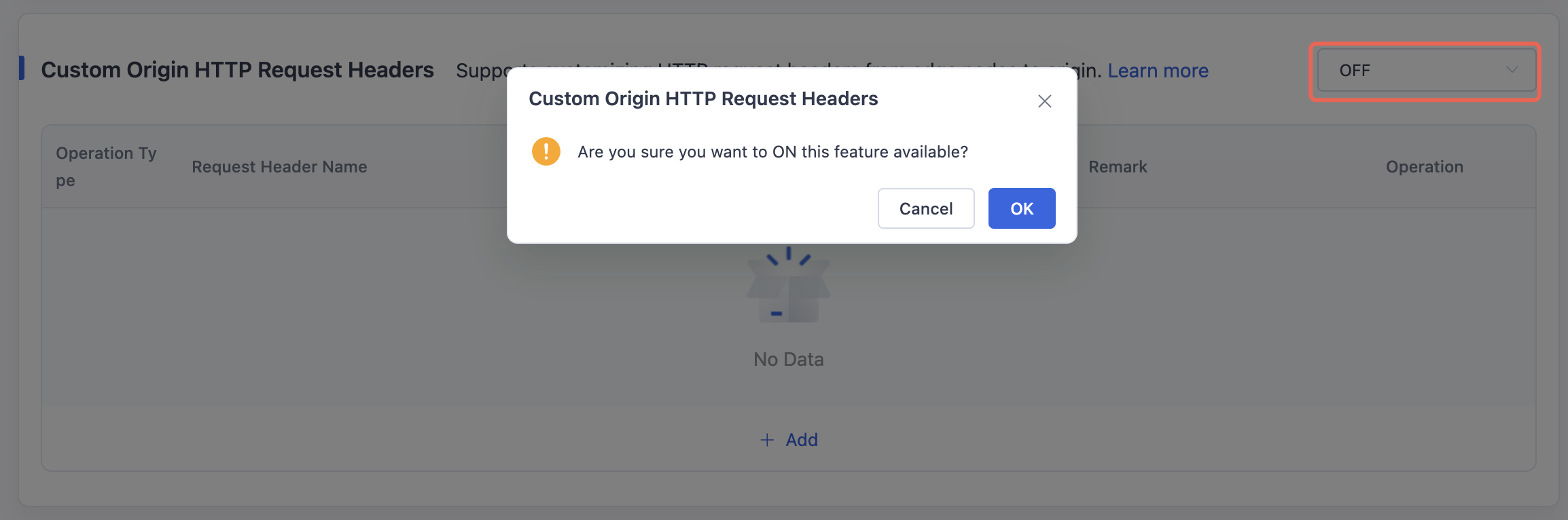
Click the Add button to configure custom origin request header rules.
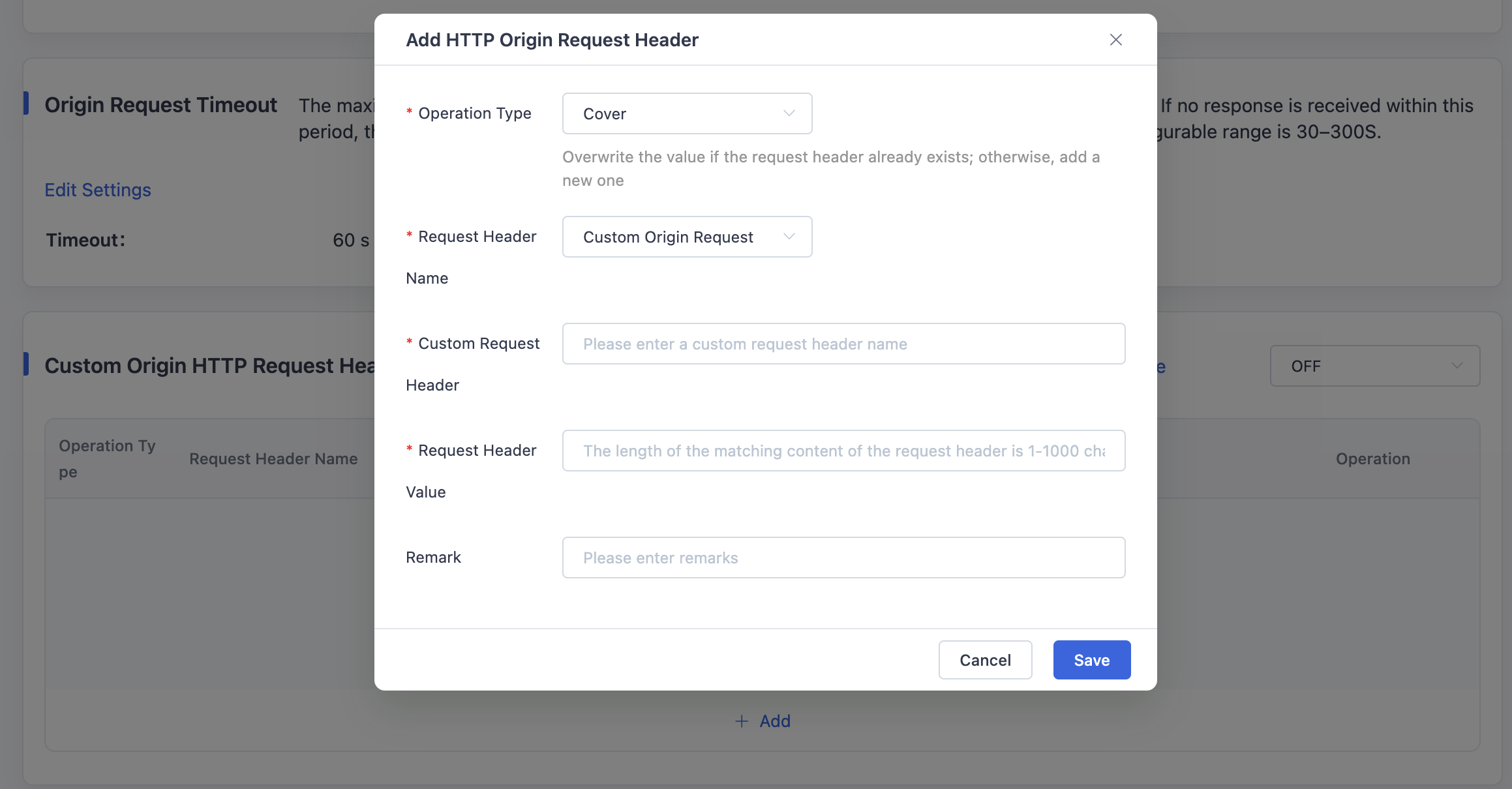
Save the configuration to apply the changes to the selected template.
Need help? Contact our support team at support@edgenext.com.
Back to documentation home