

Security CDN
Purge Cache
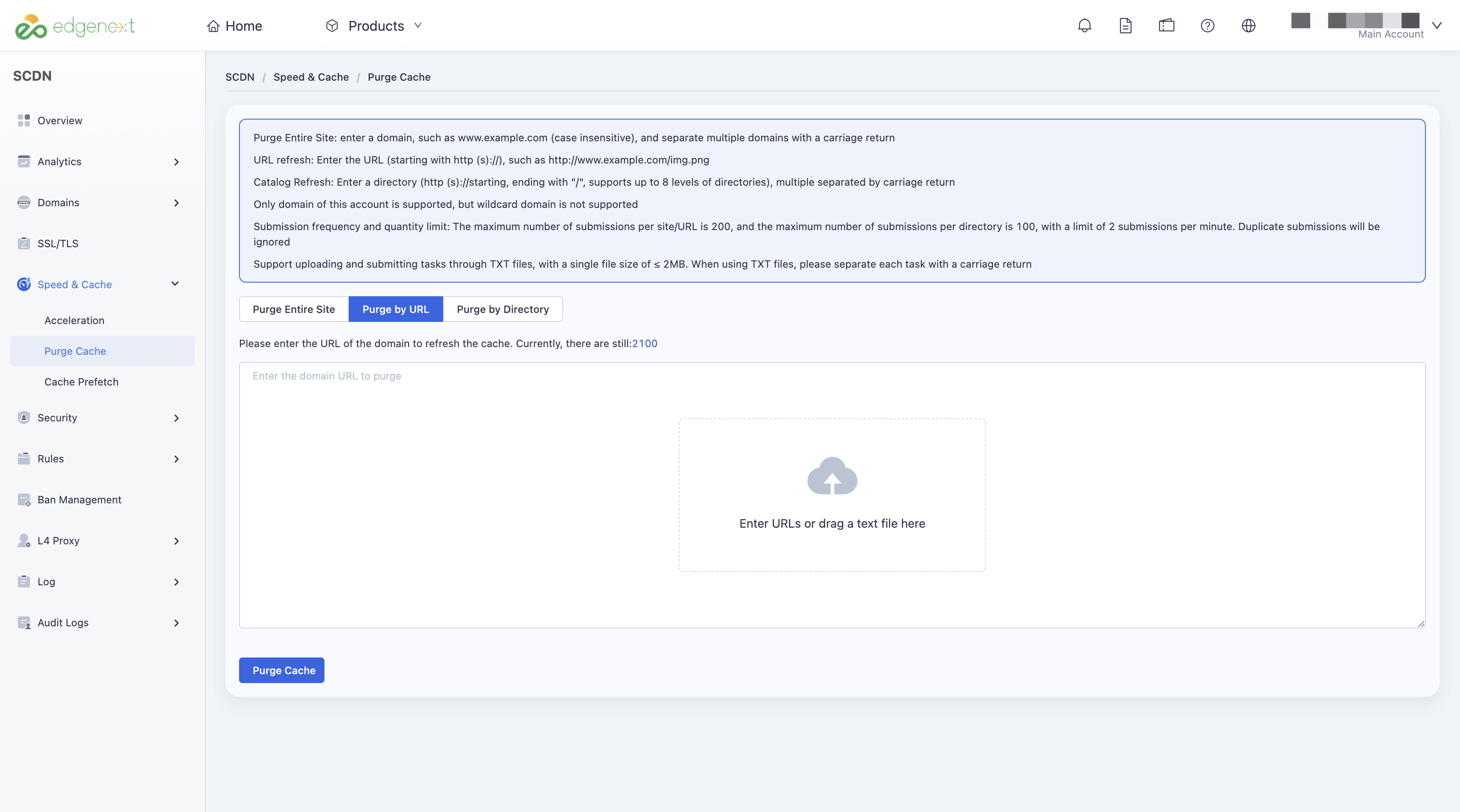
Purge Cache allows users to instantly invalidate cached resources to ensure updated website content takes effect immediately. Users can submit cache purge tasks via the Security CDN Console to make sure end-users always access the latest version of resources.
Use Cases
- Website content updates
After updating HTML, CSS, JS, images, or config files, old versions may still be cached. Use purge to ensure users immediately get the updated content. - Urgent content takedown or risk control
If incorrect, outdated, or risky content (e.g., compliance violations) was accidentally published, purging the cache removes it from edge nodes instantly, preventing further access or spread. - Validating cache policy changes
After modifying cache rules (such as TTL, cache key, query parameter behavior), purging helps ensure new rules take effect immediately without interference from stale cache during validation.
Cache Purge Rules
Purge Types
- Entire Site: Enter the full domain name (e.g., www.example.com, case-insensitive). Separate multiple domains with line breaks.
- URL: Enter the full URL (must start with http(s)://), e.g., http://www.example.com/img.png.
- Directory: Enter the directory URL (must start with http(s):// and end with “/”). Up to 8 levels of directories are supported. Separate multiple entries with line breaks.
Scope
- Only domains already added under the current account are supported.
- Wildcard domains are not supported.
Submission Limits
- Entire Site purge and URL purge: Up to 200 records per request.
- Directory purge: Up to 100 records per request.
- Each account can submit up to 2 tasks per minute.
- Duplicate records will be ignored automatically.
File Upload Method
- Supports uploading purge tasks via TXT files.
- Maximum file size: ≤ 2 MB.
- TXT file: Separate each task with a line break.
How to Use
Log in to the Security CDN Console.
In the left navigation bar, go to Speed & Cache > Purge Cache.
Choose the purge type:
- Entire Site: Purge all cached resources under the domain.
- URL: Purge specific URLs.
- Directory: Purge all resources under a specified path.
Enter the purge target(s) in the input field.
Click Refresh to submit the purge task.
Need help? Contact our support team at support@edgenext.com.
Back to documentation home