

Cache Rules
Cache rules are used to configure edge node caching policies for static resources, aiming to improve access performance, reduce origin load, and enhance the end-user experience.
By flexibly setting cache paths, file types, priorities, and cache durations, you can precisely control caching behavior based on your business needs.
1. Cache Rule Overview
1.1 Matching Fields and Logic
| Matching Field | Description | Matching Logic |
|---|---|---|
| URI Full | The complete URL path in the client request, including query parameters. Case-sensitive. e.g., https://example.com/content?page=1234 | Equals Not Equal Contains Does not Contain Regex Match |
| URI Path | The path portion of the client request URL, excluding query parameters. Case-sensitive. e.g., /content | Equals Not Equal Contains Does not Contain Regex Match |
| URI Query String | The part of the request URL after the ?. e.g., page=1234 | Equals Not Equal Contains Does not Contain Regex Match |
| URI | The full request path including the path and file name, but excluding query parameters. e.g., /content?page=1234 | Equals Not Equal Contains Does not Contain Regex Match |
| URI Directory | The directory portion of the request path. Typically used to apply rules to all resources under a specific path. e.g., /content/ | Equals Not Equal Contains Does not Contain |
| Client IP | The client IP that accesses the Security CDN edge node (i.e., $remote_addr). Supports IPv4, IPv6. e.g., 1.1.1.1 | IN Not IN IN IP List Not IN IP List |
| Request Headers | Any header field carried in the HTTP request, used to control caching policies based on values like User-Agent, Referer, Cookie, etc. | Equals Not Equal Contains Does not Contain Not Found |
| Referer | The source URL of the request, i.e., the page from which the request originated. e.g., https://www.example.com/page | Equal to Does not Equal to Contains Does not Contain Not Found |
| Cookie | Cookie content carried in the request. Useful for setting caching strategies based on user identity or login status. e.g., name=value | Equals Not Equal Contains Does not Contain Regex Match |
| User-Agent | Browser and rendering engine identification sent by the client. e.g., Mozilla/5.0 (Macintosh; Intel Mac OS X 10_12_6)... | Equal to Does not Equal to Contains Does not Contain Not Found Regex Match |
| X-Forwarded-For | The real client IP added by a proxy server in the request header. e.g., 192.0.2.0,192.0.4.0 | Equals Not Equal Contains Does not Contain |
| Origin | The origin of a cross-origin request (scheme + hostname + port). e.g., https://example.com | Equals Not Equal Contains Does not Contain Length Equal To Length Less Than Length Greater Than |
| Visitor Region | The geographic region where the request to the SCDN edge node originated. Supports continent or country level. e.g., China | IN Not IN |
| Request Protocol | The protocol used in the client request, typically HTTP or HTTPS. | Equal to Does not Equal to |
| File Extension | The file extension in the requested URI, commonly used to identify static resources. e.g., jpg, png, css, php | IN Not IN |
| Request Method | The HTTP method used in the client request. e.g., HEAD, GET, POST, PUT, DELETE, OPTIONS, PATCH | Equals Not Equal IN Not IN |
| Hostname | The hostname in the request header, indicating the domain being accessed. e.g., example.com | Equals Not Equal Contains Does not Contain |
| File Name | The last part of the requested URI, i.e., the file name including its extension. e.g., media.mp3 | Equals Not Equal |
1.2 Execution Options Description
| Option | Description |
|---|---|
| Edge Cache TTL | Customize the caching duration for resources on edge nodes. Effective for specified file types and HTTP status codes 200/206. 404 responses are cached for 10 seconds by default; other conditions are not cached by default. Default: Follow origin Cache-Control, Use default policy if absent. |
| Browser Cache TTL | Customize how long the client browser should cache the response. Within the TTL, the browser loads resources locally to improve speed and reduce repeated requests. Default: Follow origin Cache-Control. |
| Sort Query String | When enabled, the system ignores parameter order in the URL query string and caches based only on parameter names and values, improving cache hit rate. Default: OFF |
| Query String | Controls whether and how the URL query string is used in the cache key. By default, different query strings generate different cache entries. Default: Keep all query strings. |
| Cookie | Allows selecting specific cookie fields to be included in the cache key, enabling more granular caching strategies. Default: Retain all cookies. |
| Ignore Case | Configure whether the cache key should ignore letter casing in the URL. When enabled, improves cache efficiency by treating uppercase and lowercase as equal. Default: Case-sensitive (do not ignore). |
| Cache Sharing | Configure whether to share the same cache between HTTP and HTTPS requests. When enabled, resources requested over both protocols will use a shared cache to improve hit rate. Default: Not share |
1.3 Default Caching Policy
The default caching policy applies in the following cases:
- Supported HTTP Status Codes:
- 200,206 : Apply the default caching policy.
- 404 : Cached for 10 seconds by default.
- Other status codes: Not cached.
- Request Method Restriction: The policy only applies to GET and HEAD requests.
The edge node caching strategy is as follows:
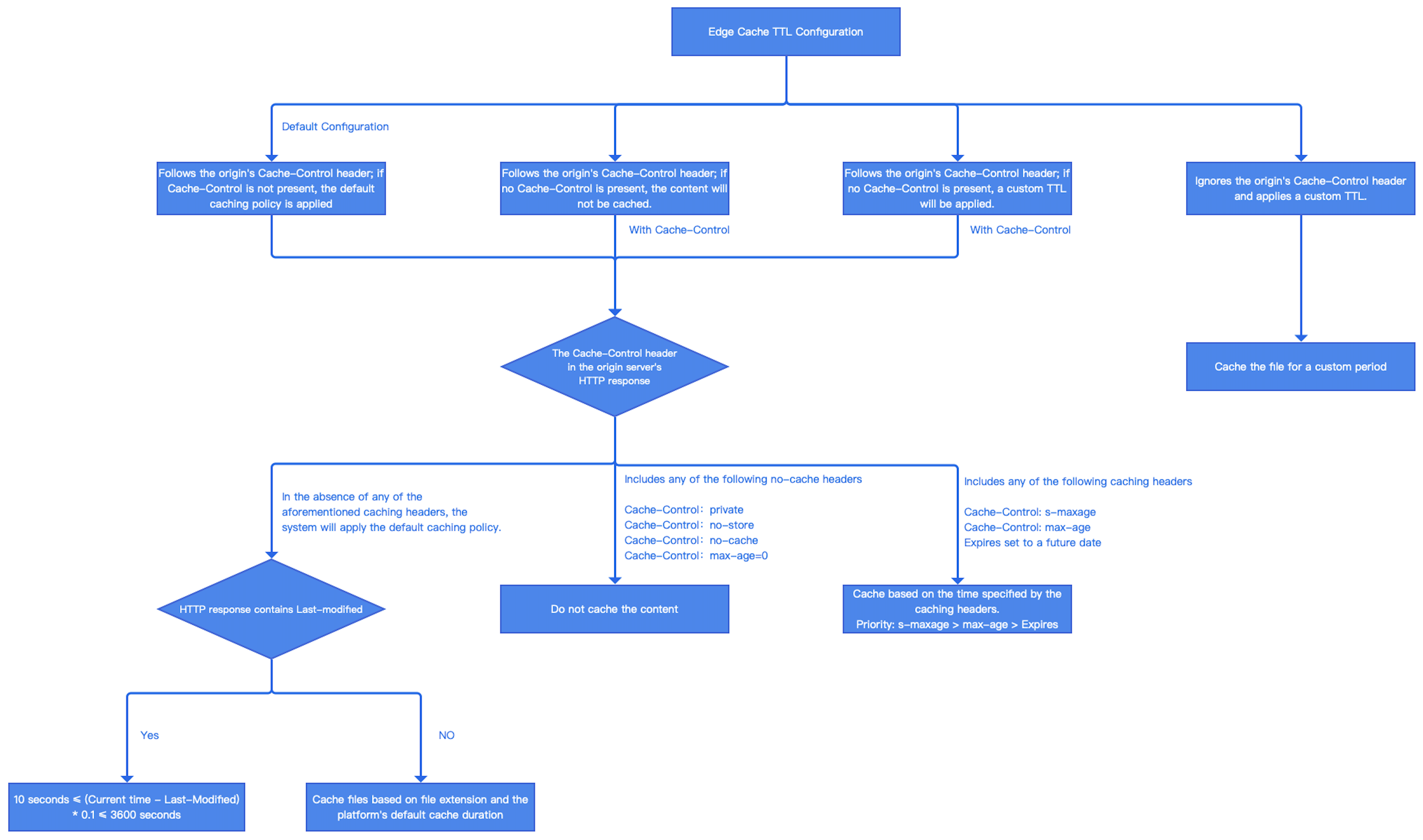
Under the platform's default caching strategy, edge nodes determine whether and how long to cache a resource based on the cache-related headers returned by the origin server. The rules are as follows:
If the HTTP response header contains any of the following directives, the file will not be cached:
- Cache-Control:private
- Cache-Control:no-store
- Cache-Control:no-cache
- Cache-Control:max-age=0
If the HTTP response header contains any of the following directives, the file will be cached for the time specified in the header:
- Cache-Control: s-maxage
- Cache-Control: max-age
- Expires is set to a future date
If multiple caching directives are present, the cache duration will follow this priority order:s-maxage > max-age > Expires.
- If none of the above caching headers are present in the HTTP response, the cache duration will follow one of these rules:
Default Caching Policy
If Last-Modified is present
The cache time will be calculated as:
Cache TTL = (Current Time Last-Modified) * 0.1
If the result is < 10 seconds, set TTL to 10 seconds
If the result is > 3600 seconds, set TTL to 3600 seconds
Otherwise, use the calculated TTL value
If Last-Modified is absent
The cache TTL will be determined by the file extension, according to the default rules:
File Type Extensions Default TTL Static files Images: jpg, png, jpeg, webp, gif, heif, heic, kpg, ico
Audio/Video: mp4, mp3, m3u8, ts, m4a, avi, m4s, ogg
Web: js, css
Archives: zip, 7z, tar, br, gz, rar, bz2
Documents: doc, docx, xls, xlsx, pdf, ppt, pptx Apps: apk, exe, bin
Others: vsv, iso, jar, swf, chunk, atlas2 Hours Dynamic files php, aspx, asp, jsp, do, dwr, cgi, fcgi, action, ashx, axd, json Not Cached Other types / Not Cached Not cached: If no cache headers are present and the file type is not recognized, the file will not be cached.
Ignore origin Cache-Control, Apply custom TTL:In this mode, edge nodes will cache resources based on the specified TTL value, regardless of no-cache, no-store, or private directives from the origin server.
1.4 Rule Priority Description
Each domain can have multiple cache rules. When a request matches multiple cache rules, all matched rules are executed sequentially from top to bottom.
If multiple rules configure the same cache operation, only the setting from the last matching rule takes effect.
For example:
- Rule 1 matches example.com/index.jpg, sets the Edge Cache TTL to 30 minutes, and configures the custom cache key to ignore the query string.
- Rule 2 matches all requests under example.com, sets the Edge Cache TTL to 60 minutes.
In this case, the effective result is:
- The Edge Cache TTL for requests to example.com (including example.com/index.jpg) will be 60 minutes.
- The cache key for example.com/index.jpg will ignore the query string,
- Other URLs under example.com will retain the default behavior, where query strings are fully preserved in the cache key.
1.5 Regular Expression Matching
Users on Business Edition and Enterprise Edition plans can use the Regular Expression matching operator.
Regular expressions are processed using the Rust regex engine.
If you use regular expressions, you may test them with tools such as Regex101 or Rustexp.
2. Configuration Guide
Log in to the Security CDN console.
In the left navigation panel, go to Speed & Cache and click Acceleration to enter the global configuration page.
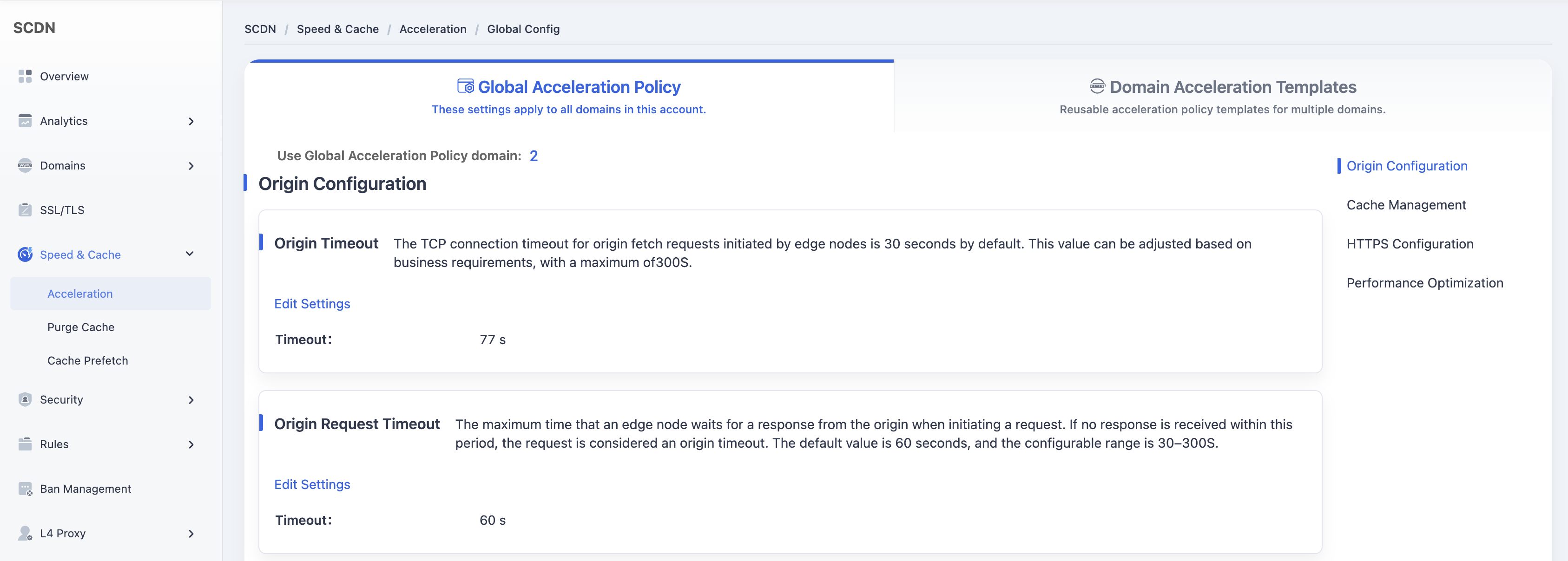
At the top, click Domain Acceleration Template Configuration to switch to the Template Management page.
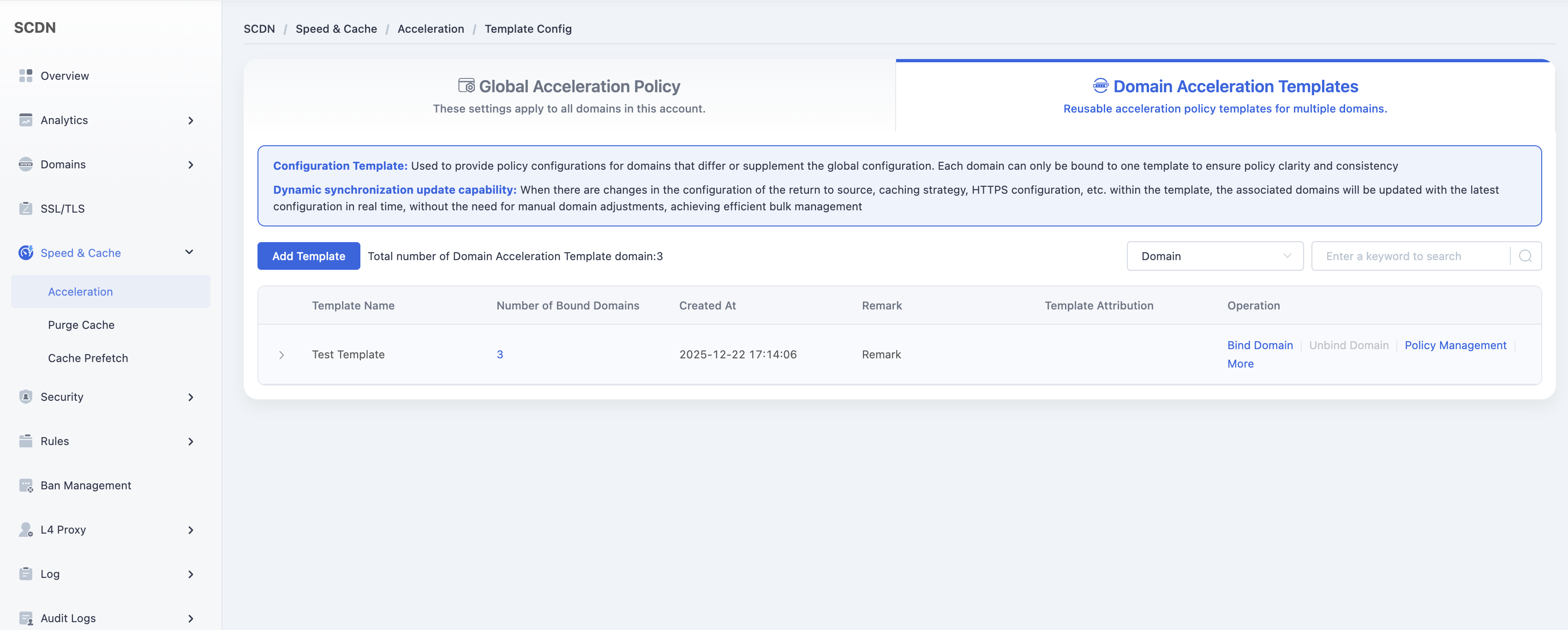
In the template list, locate the template to be edited, and click Policy Management in the Actions column to access the template configuration page.
Scroll down to Cache Management – Cache Rules module, and click Add Cache Rule to open the rule creation window.
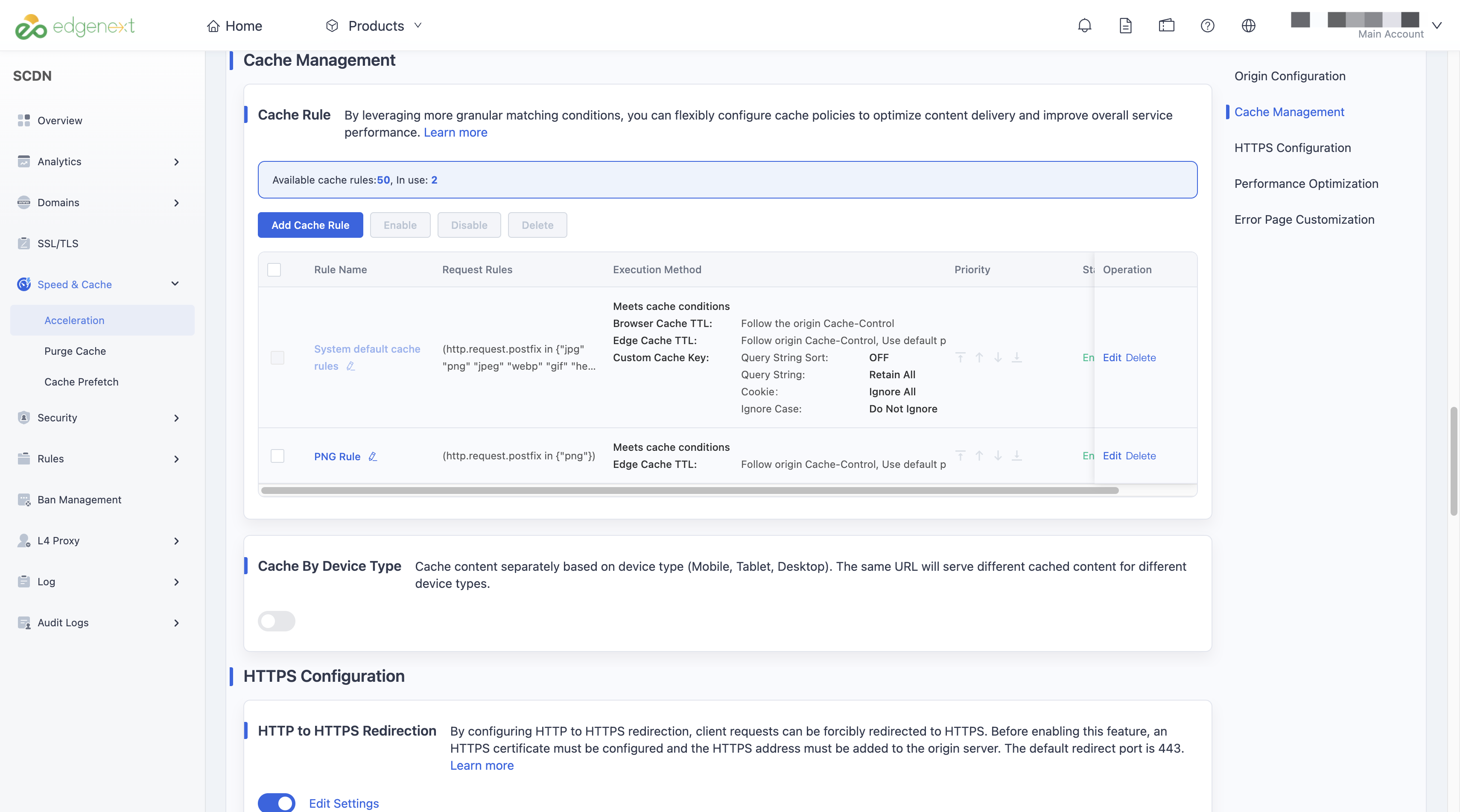
When adding a cache rule, you need to complete the following three sections:
Rule Name: Required. Supports 1–64 characters, including Chinese characters, letters (case-sensitive), numbers, and common special symbols.
Request Rules: Supports All Requests or Custom Rules. For custom rules, refer to the Matching Fields and Logic documentation.
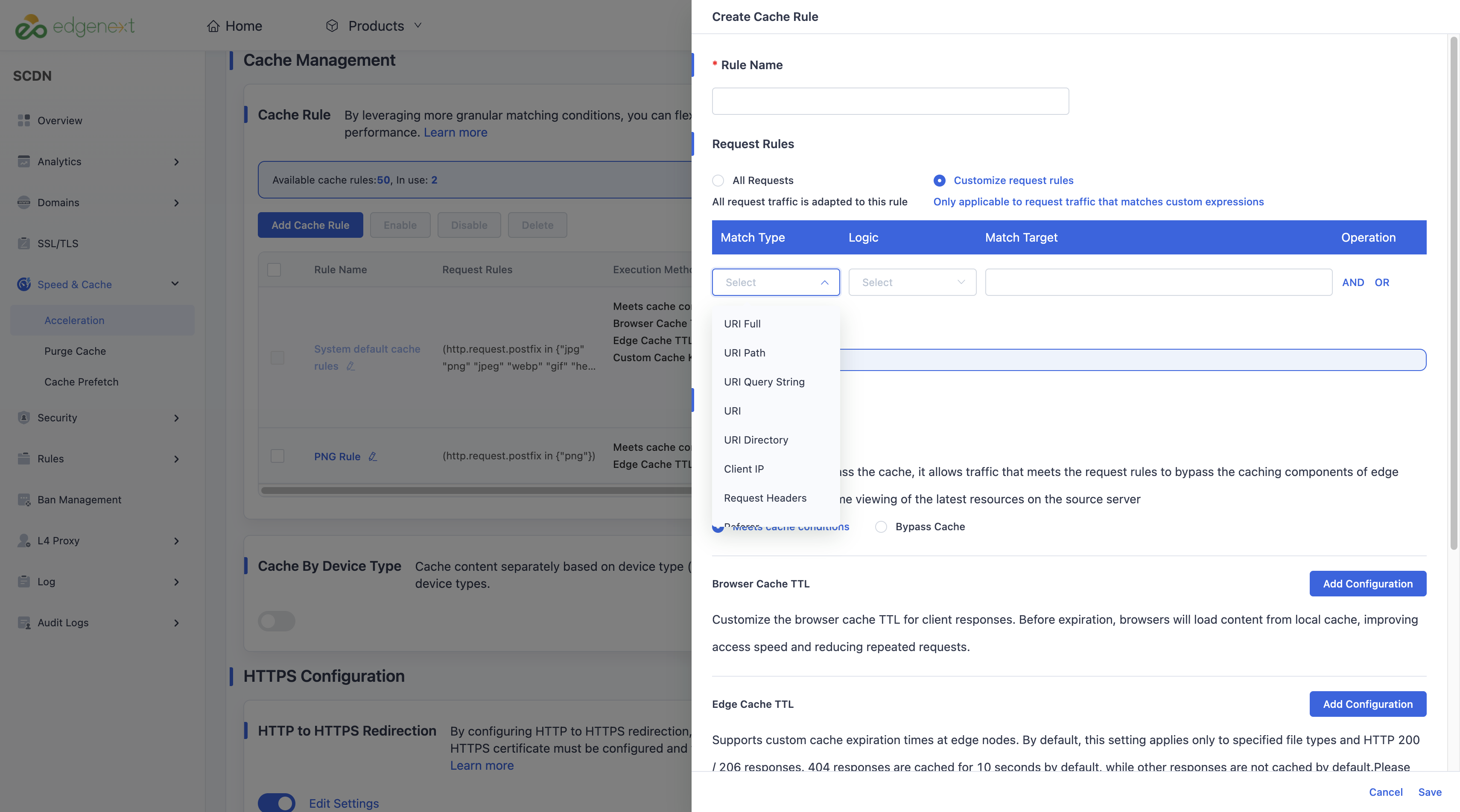
Execution Method: Choose between Cache or Bypass Cache. When selecting Cache, refer to the Action Type Description for configurable options.
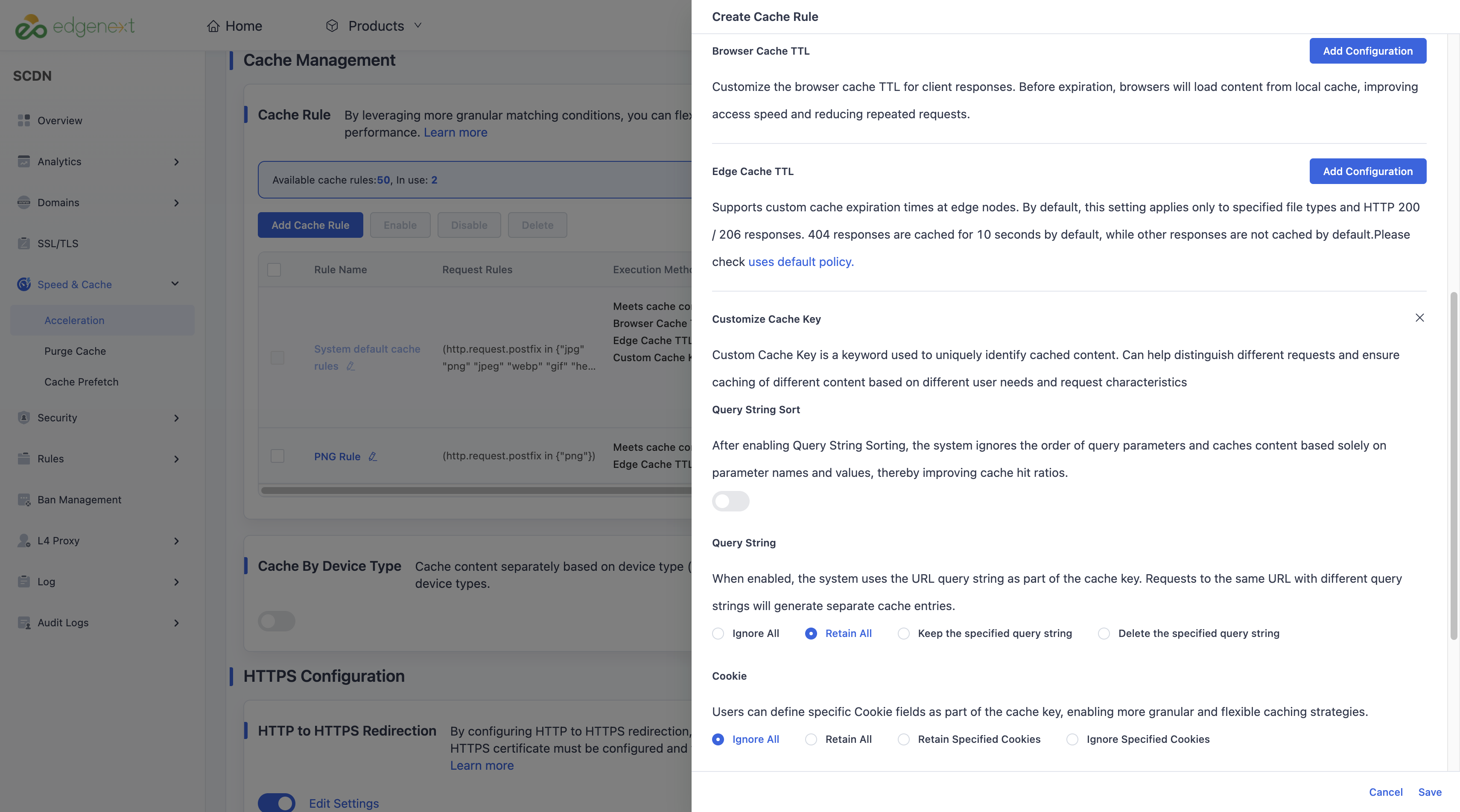
Click Save to save the rule. The cache rule will be added to the current template configuration.
Need help? Contact our support team at support@edgenext.com.
Back to documentation home