

Custom Response Header
Configuration Scenarios
When users request your business resources, you can configure headers in the returned response to enable features such as cross-origin access.
Response header configuration applies at the domain level. Once enabled, it takes effect for responses of all resources under the domain. Configuring response headers only affects client-side (e.g., browser) behavior and does not change the caching logic of CDN nodes.
Configuration Guide
View Configuration
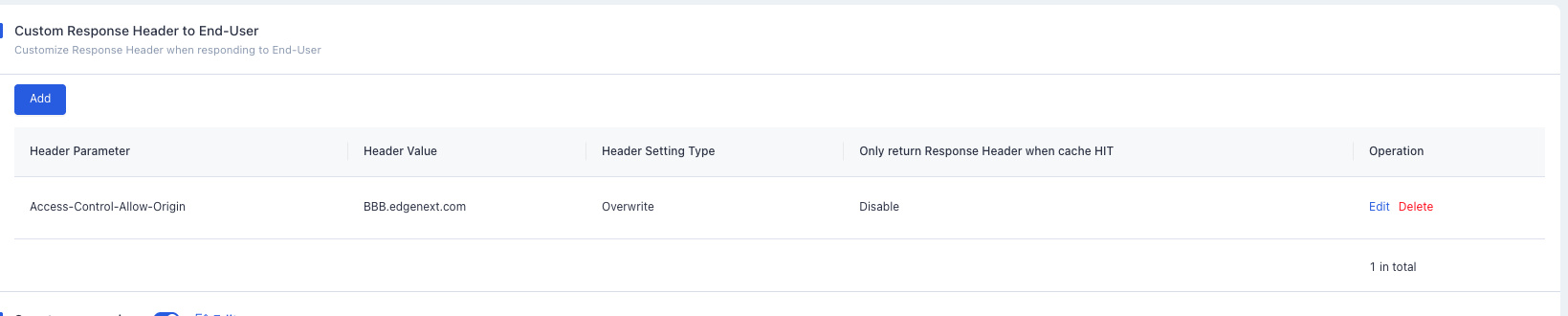
Log in to the CDN console, select Configuration → Domain Config from the menu bar, and click Details in the operation column on the far right of the target domain to enter the domain configuration page. You can find the Custom Response Header to End-User setting under Advanced, which is disabled by default. Click Add to configure HTTP response header rules.
Header Setting Types
| Type | Description |
|---|---|
| Overwrite | Sets the specified response header to the configured value. If the header does not exist, it will be added. If multiple duplicate headers exist, they will all be updated and merged into a single header. For example, with the rule Set x-cdn: value1, if a response contains multiple x-cdn headers, they will all be replaced and merged into one x-cdn: value1 header. |
| Add | Adds a new response header with the specified value. If the header already exists in the response, the original header and its value will be retained, and no new header will be added. |
Header Parameters
| Header Parameter | Description |
|---|---|
| Access-Control-Allow-Origin | Resolves cross-origin resource access permissions. The domain value defines which origins are allowed to access the resource. If the request origin Host matches an entry in the configured list, the corresponding value will be returned in the response header. You can also use the wildcard * to allow requests from all origins. Supports *, or multiple domains/IPs/mixed entries (must include http:// or https://, separated by commas, e.g. http://test.com,http://1.1.1.1). Maximum input length: 1000 characters. |
| Access-Control-Allow-Methods | Specifies the HTTP methods allowed for cross-origin requests. Multiple methods can be configured at once, e.g. Access-Control-Allow-Methods: POST, GET, OPTIONS. |
| Access-Control-Max-Age | Specifies the validity period of preflight requests in seconds. For non-simple cross-origin requests, an additional preflight request is required before formal communication to verify whether the cross-origin request is safe. Non-simple requests include: requests using methods other than GET, HEAD or POST; POST requests with content types other than application/x-www-form-urlencoded, multipart/form-data or text/plain (such as application/xml or text/xml); or requests with custom headers. Example: Access-Control-Max-Age: 1728000 means no additional preflight request is needed for cross-origin access to this resource within 1728000 seconds (20 days). |
| Access-Control-Expose-Headers | Specifies which headers can be exposed to the client as part of the response. By default, only 6 headers are exposed: Cache-Control, Content-Language, Content-Type, Expires, Last-Modified, Pragma. To expose additional headers, configure this field with values separated by commas, e.g. Access-Control-Expose-Headers: Content-Length,X-My-Header. |
| Content-Disposition | Triggers file download in the browser and sets the default filename. For file types natively supported by browsers (such as TXT, JPG), the browser opens the file by default. To prompt the user to save the file instead, configure this field to override the default behavior. Common configuration: Content-Disposition: attachment;filename=FileName.txt |
| Content-Language | Defines the language code of the page. Common configurations: Content-Language: zh-CN, Content-Language: en-US. |
Access-Control-Allow-Origin Matching Modes
| Matching Mode | Domain Value | Description |
|---|---|---|
| Full Match | * |
When set to *, the response header Access-Control-Allow-Origin: * is added. |
| Exact Match | http://test.edgenext.com, https://test.edgenext.com, http://www.edgenext.com |
If the origin https://test.edgenext.com matches the list, the response header Access-Control-Allow-Origin: https://test.edgenext.com is added. If the origin https://www.test.com does not match, the response remains unchanged. |
| Second-Level Wildcard Match | https://*.edgenext.com |
If the origin https://test.edgenext.com matches the list, the response header Access-Control-Allow-Origin: https://test.edgenext.com is added. If the origin https://www.test.com does not match, the response remains unchanged. |
| Port Match | https://test.edgenext.com:8080 |
If the origin https://test.edgenext.com:8080 matches the list, the response header Access-Control-Allow-Origin: https://test.edgenext.com:8080 is added. If the origin https://www.test.com does not match, the response remains unchanged. |
Configuration Example
Suppose the response header configuration for the accelerated domain test.edgenext.com is as follows:
When accessing the resource http://test.edgenext.com/test/test.mp4 from http://AAA.edgenext.com/test/test.html, the browser will throw a cross-origin access error, as AAA.edgenext.com is not in the allowed cross-origin list of test.edgenext.com.
When accessing the resource http://test.edgenext.com/test/test.mp4 from http://BBB.edgenext.com/test/test.html, the browser access works normally, as BBB.edgenext.com is in the allowed cross-origin list of test.edgenext.com.
Need help? Contact our support team at support@edgenext.com.
Back to documentation home