

Cache Configure
The configuration function for domain caching rules has been fully upgraded. Newly added domains will automatically use the new version of caching rules, while existing domain will continue to use the old version. The functions described in this document cover both the old and new versions of caching rules. Some functions are only supported by the new version of caching rules and will be marked with “(New Version Only)” at the corresponding positions in the main text.
Configuration Scenarios
When a user requests data from an EdgeNext CDN node, the node checks whether it has cached the requested data and if the cached data has expired. If the node has the cached data and it has not expired, the cached data is directly returned to the user to improve access speed; otherwise, the CDN node sends an origin request to the origin server, retrieves the content responded by the origin server, returns the latest data to the user, and updates the locally cached content with the origin server's response content in accordance with the caching configuration.
EdgeNext CDN allows CDN users to customize the data cache time management for specific services. Proper configuration of cache time can effectively improve the hit rate, reduce the origin-pull rate, and save the user's bandwidth.
Configuration Guide
View Configuration
Log in to the CDN console, select [Configuration] -> [Domain Config] from the menu bar, and click [Details] in the operation column on the far right of the domain to enter the domain configuration page. Cache rules can be added in the third section (Cache Configuration).
When connecting an accelerated domain, if the caching rules follow the platform defaults (i.e., no configuration is set), the domain will prioritize following the origin server. If the origin server does not respond with any cache-related or no-cache-related header information, the EdgeNext platform's intelligent caching rules will be applied to help users reduce origin pulls and improve access performance.
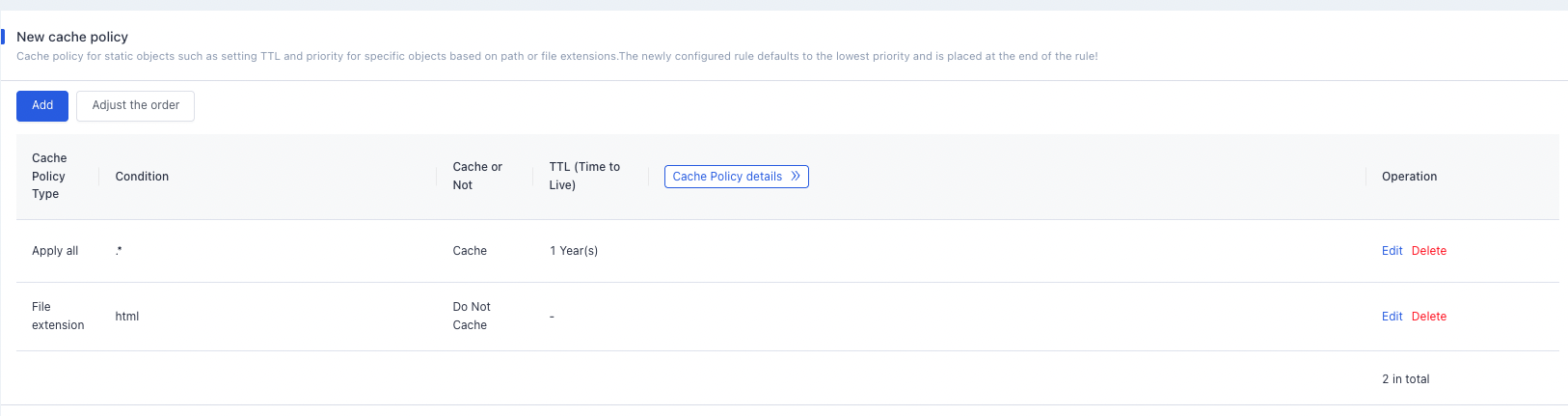
Add New Rules
Supports custom configuration of node caching behavior through multiple types of parameters:
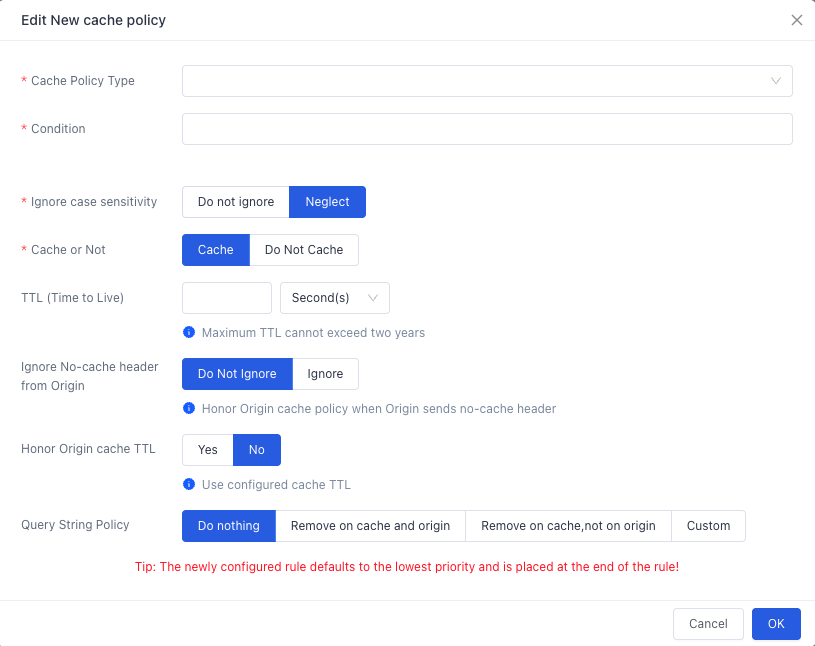
Parameter Description
| Configuration Parameter | Configuration Options | Configuration Description |
|---|---|---|
| Type | All | Applies the same caching rules to all resources; the default configuration is .* |
| Type | Suffix | Sets caching rules for specified file types by file suffix: ● Different suffixes are separated by ",", with no spaces allowed; ● Alphabetic characters in file suffixes support both uppercase and lowercase; ● Only a-zA-Z0-9\., characters are allowed. Example: jpg,png,htmlReference examples for filling: ● Dynamic files: asp,php,jsp,ashx,aspx,do ● Image files: jpg,jpeg,png,gif,webp,bmp,ico,tiff ● Style files: js,css,xml,json ● Audio/Video files: wmv,mp3,wma,ogg,flv,mp4,avi,mpg,mpeg,f4v,hlv,rmvb,rm,3gp,img,m3u8,ts,swf ● Download files: bin,zip,rar,ipa,apk,jar,sis,xap,msi,exe,cab,7z ● Page files: txt,htm,shtml,html ● Homepage: / ,index.shtml,index.html,index.php,index.aspx,index.htm |
| Type | Directory (New Version Only) | Sets caching rules for specified paths of a domain. Input requirements: must start with "/", separated by ",", and only a-zA-Z0-9_\/, characters are allowedExample: /test/folder01/,/test/folder02/ |
| Type | Path (New Version Only) | Sets caching rules for a full-path file of a domain. Input requirements: must start with "/", and "" cannot be at the end. Supports matching specific files or files with the wildcard "" under a specified directory. ● Only one full path can be configured in a single full-path caching rule. ● Sets cache expiration time using full file paths; different paths are separated by ",". ● Only a-zA-Z0-9_\/, characters are allowedExample: /test/index.html,/test/*.jpg |
| Type | Regular Expression | Sets caching rules for specified file types using regular expressions. Input requirements: must start with "^", and fully supports all regular expression rules:Example: `^HTTPS?://[^/]+/(imager |
| Cache Time | Set Cache Time | After the set cache expiration time is reached, when a user requests a resource from the CDN node, the CDN will directly send a request to the origin server for the corresponding latest resource, return it to the user, and cache it on the CDN node.The maximum cache time cannot exceed 2 years.If the cache time is set to 0, the CDN node will not cache the resource. |
| Priority | Positive Integer (0~65535) | Priority settings are unique; multiple caching rules cannot be set with the same priority, and the priority field cannot be left empty.For multiple caching rules, if the same resource content is covered by different rules, the CDN executes the cache expiration according to the rule with the higher priority.Positive integer (0~65535); the smaller the value, the higher the matching priority. |
| Processing of Parameters After Question Mark | Cache with/without Parameters | No Processing (Default): Caches and pulls from the origin server with parameters after the question mark.Remove for Both Cache and Origin-pull: Removes parameters after the question mark for both caching and origin-pull (recommended if file content is consistent even with different parameters after the question mark, as it can reduce origin pulls) |
| Ignore Origin Server No-Cache Headers | Set Whether to Ignore Origin Server No-Cache Headers | Do Not Ignore (Default): For files matching the caching rule configuration, if the origin server responds with no-cache-related headers, the CDN follows the origin server's response headers and does not cache the file.Ignore (Force Cache): For files matching the caching rule configuration, the CDN enforces caching according to the corresponding rules even if the origin server responds with no-cache/no-store/private headers. |
| Follow Origin Server Expiration Time | Set Whether to Follow Origin Server Expiration Time | Follow: For files matching the caching rule configuration, if the origin server responds with expiration time-related headers, the CDN follows the expiration time carried in the origin server's response headers.Do Not Follow (Default): For files matching the caching rule configuration, if the origin server responds with expiration time-related headers, the CDN ignores the origin server's response headers and follows the expiration time configured on the CDN. |
Default Caching Policy
When a user requests a business resource of yours and there are no caching rules configured for that resource in the CDN console, the following platform policies apply by default:
POST requests are not cached.
Common dynamic suffixes are not cached by default:
php|ashx|aspx|asp|jsp|do|cgi-bin;Resources are not cached if the response header does not contain the
Last-Modifiedheader ormaxageheader information;Resources with a
content-lengthof 0 are not cached;Responses with 301/302 status codes are not cached;
Responses with 404 or 5xx status codes are not cached;
Resources are not cached if the response header does not contain the
Last-Modifiedandmax-agefields.For all other cases, the origin server is followed by default:
If the
Cache-Controlfield exists in the HTTP Response Header of the origin server:
- If the
Cache-Controlfield is set tomax-age, the CDN node caches the resource for the duration specified by themax-agevalue. - If the
Cache-Controlfield is set tono-cache/no-store/private, the CDN node does not cache the resource.
- If the
If the
Cache-Controlfield does not exist in the HTTP Response Header of the origin server: the CDN node follows the EdgeNext intelligent caching policy.
If the
Cache-Controlfield does not exist in the HTTP Response Header of the origin server, the EdgeNext intelligent caching policy is applied:- Directories|js|css|html|htm|xml: cached for 30 minutes;
- swf|jpg|gif|png|bmp|ico: cached for 1 day;
- wmv|mp3|wma|ogg|flv|mp4|avi|mpg|mpeg|f4v|hlv|rmvb|rm|3gp|img|bin|zip|rar|ipa|apk|jar|sis|xap|msi|exe|cab|7z|pdf|doc|docx|xls|xlsx|ppt|pptx|txt: cached for 1 year;
- Dynamic adjustment for all other resources:
- The cache time ranges from 0 to 2 hours, determined by the
lastmod(last modified time). Newer files have shorter cache times (i.e., files updated more frequently have shorter cache times). - Users are also allowed to force a refresh (Ctrl+F5).
- The cache time ranges from 0 to 2 hours, determined by the
Configuration Example
If the node cache expiration configuration for the accelerated domain a.test.EdgeNextcdnx.cn is as follows:
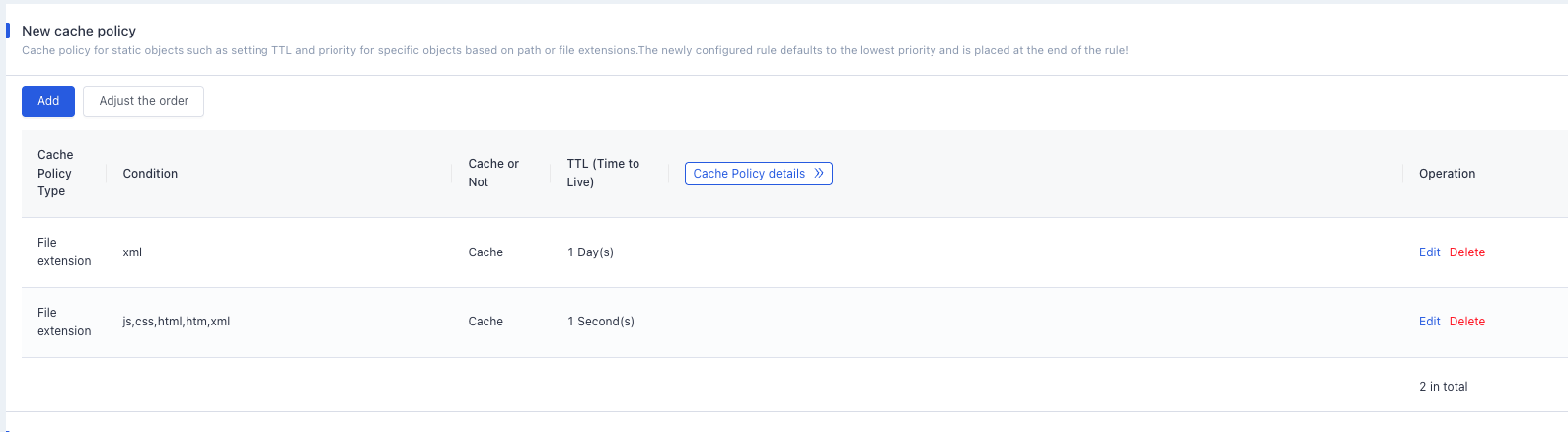
The actual caching behavior is as follows:
- The resource
a.test.EdgeNextcdnx.cn/abc.xmlis cached on the node for 1 day, even if theCache-Controlfield of the origin server is set tono-cache/no-store/private. - The resource
a.test.EdgeNextcdnx.cn/def.jsis not cached on the node. - The resource
a.test.EdgeNextcdnx.cn/def.jpgdoes not match any CDN caching rules, so the CDN default caching policy is applied. The origin server's response has aCache-Controlfield set tomax-age=3600, so the resource follows the origin server's caching policy and is cached on the CDN for 1 hour. - The resource
a.test.EdgeNextcdnx.cn/def.mp3does not match any CDN caching rules, and the origin server does not respond with aCache-Controlfield. Therefore, the EdgeNext intelligent caching policy is applied, and the resource is cached for 1 year.
Need help? Contact our support team at support@edgenext.com.
Back to documentation home