

Access Control by Referer Header
Configuration Scenarios
If you wish to control the access sources of business resources, EdgeNext CDN provides you with the Referer anti-leech configuration feature.
By setting access control policies for the value of the Referer field in the user's HTTP Request Header, you can restrict access sources and prevent malicious users from stealing and overusing resources.
Configuration Guide
View Configuration
Log in to the CDN console, select [Configuration] -> [Domain Config] in the menu bar, and click [Details] in the operation column on the far right of the domain to enter the domain configuration page. You can view the Referer blocklist and allowlist configuration in the fourth section (Access Control), which is disabled by default.
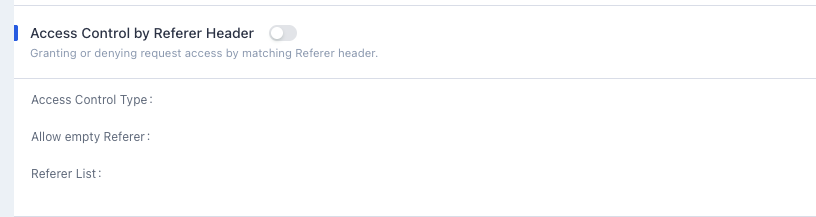
Enable Configuration
Click the switch, select the Referer type and fill in the list, check whether to allow empty Referer, fill in the Referer to be configured and click [OK] to enable the Referer blocklist and allowlist configuration:
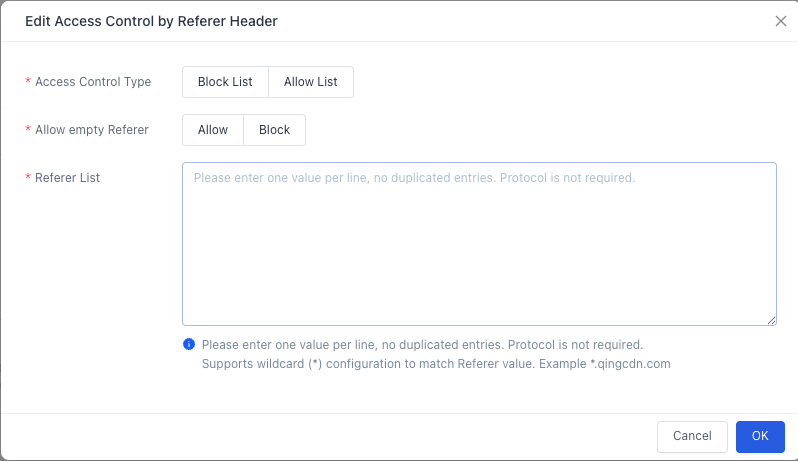
Referer Blocklist
- If the Referer field of the request matches the content set in the blocklist, the CDN node refuses to return the request information and directly returns a 403 status code.
- If the Referer of the request does not match the content set in the blocklist, the CDN node returns the request information normally.
- When empty Referer is allowed, if the Referer field of the request is empty or there is no Referer field (e.g., browser requests), the CDN node refuses to return the request information and returns a 403 status code.
Referer Allowlist
- If the Referer field of the request matches the content set in the allowlist, the CDN node returns the request information normally.
- If the Referer field of the request does not match the content set in the allowlist, the CDN node refuses to return the request information and directly returns a 403 status code.
- When a allowlist is set, the CDN node can only return requests that match the string content in the allowlist.
- When empty Referer is allowed, if the Referer field of the request is empty or there is no Referer field (e.g., browser requests), the CDN returns the request information normally.
Configuration Constraints
- Anti-leech supports domain/IP rules, and the matching method is prefix matching (prefix matching for domains is not supported, only for paths). For example, if the configured list is
www.test.com, thenwww.test.com/123matches, whilewww.test.com.cndoes not; if the configured list is127.0.0.1, then127.0.0.1/123also matches. - One entry per line, no duplicates, no need to start with "http://" (e.g., www.EdgeNext.com), with a maximum of 100 entries.
- Wildcard
*.is supported to match any host header (e.g.,*.qingcdn.com).
Disable Configuration
You can disable the anti-leech configuration with one click through the anti-leech switch. When the switch is changed from "On" to "Off", the existing configuration will be hidden; when you click to enable it next time, the historical configuration will be displayed on the configuration page.
Note:
If the service area of your accelerated domain is global acceleration, the set IP blocklist and allowlist will take effect globally, and differentiated configurations for domestic and overseas regions are not supported.
Configuration Example
If the anti-leech configuration of the accelerated domain a.test.EdgeNextcdnx.cn is as follows:
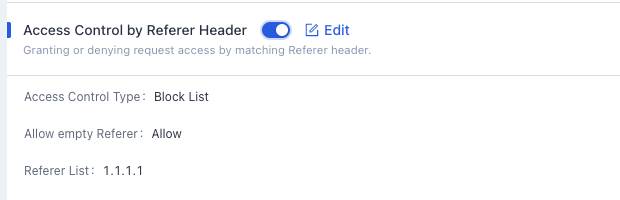
The actual access situations are as follows:
- If a user request carries an empty Referer, it hits the configured allowlist, and the content can be returned directly.
- If a user request carries the Referer information
1.1.1.1, it hits the configured blocklist, and a 403 status code is returned directly.
Need help? Contact our support team at support@edgenext.com.
Back to documentation home