

Access Control by IP
Configuration Scenarios
If you wish to control the access sources of your business resources, EdgeNext CDN provides you with the IP blocklist and allowklist configuration function.
By configuring access control policies for the IP addresses of user request terminals, you can effectively restrict access sources and prevent issues such as malicious IP scraping and attacks.
Configuration Guide
View Configuration
Log in to the CDN console, select [Configuration] -> [Domain Config] in the menu bar, and click [Details] in the operation column on the far right of the domain to enter the domain configuration page. You can view the IP blocklist and allowklist configuration in the fourth section (Access Control), which is disabled by default.

Enable Configuration
Click the switch, select Block List / Allow List, fill in the list of IP addresses or IP segments, and click [OK] to enable the IP blocklist / allowklist configuration:
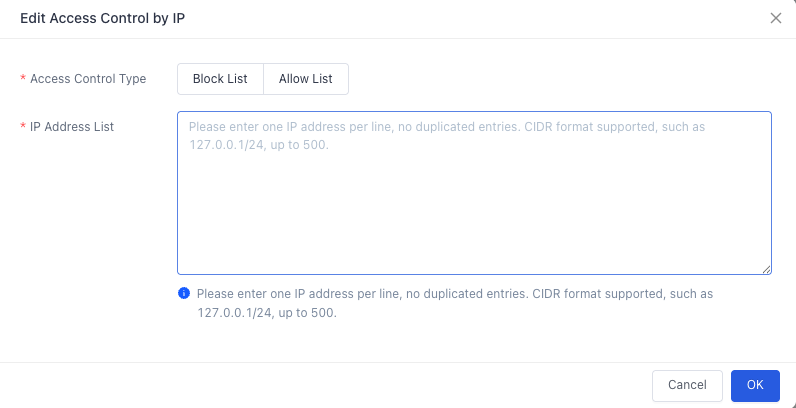
IP Blocklist
When the user terminal IP matches the IP address or IP segment in the blocklist, a 403 status code will be returned directly when accessing the CDN node.
IP Allowklist
When the user terminal IP does not match the IP address or IP segment in the allowlist, a 403 status code will be returned directly when accessing the CDN node.
Configuration Constraints
- You can only choose either IP blocklist or IP allowlist; they cannot be configured simultaneously.
- A maximum of 500 entries can be entered for each of the IP blocklist and allowlist.
- IP segments only support /8, /16, and /24 network segment formats; other network segments are not supported.
- Blocklists and allowlists in the form of
IP:Portare not supported.
Disable Configuration
You can disable the IP blocklist and allowklist configuration with one click via the switch. When the switch is disabled, historical configurations will not be displayed; when you click to enable it again, you can view the configurations before disabling.
Note:
If the service region of your accelerated domain is global acceleration, the configured IP blocklist and allowklist will take effect globally, and differentiated configurations for domestic and overseas regions are not supported.
Configuration Example
If the IP blocklist and allowklist configuration for the accelerated domain a.test.EdgeNextcdnx.cn is as follows:
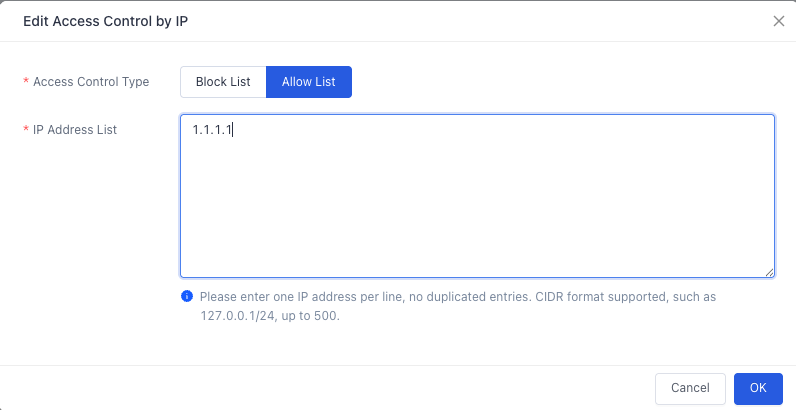
The actual access situations are as follows:
- A user with the terminal IP
1.1.1.1accesses the resourcehttp://a.test.EdgeNextcdnx.cn/test.txt, which matches the allowklist, and the content is returned normally. - A user with the terminal IP
2.2.2.1accesses the resourcehttp://a.test.EdgeNextcdnx.cn/test.txt, which does not match the allowklist, and a 403 status code is returned.
Need help? Contact our support team at support@edgenext.com.
Back to documentation home