

Purge Content
Feature Introduction
The EdgeNextCDN service provides basic cache configuration capabilities. It allows setting cache expiration times based on various rules (such as specified business types, directories, and specific URLs) to regularly clear cached resources on nodes, pull the latest resources from the origin server again, and re-cache them.
In addition, EdgeNext CDN also supports manual and immediate refresh of accelerated objects (including URLs and directories), enabling batch refresh operations for specified URLs or directories:
- URL Refresh: Delete the cache of corresponding resources on all CDN nodes.
- Directory Refresh: When end users access resources under the matched directory, the system directly pulls new resources from the origin server, returns them to end users, and re-caches the new resources.
Note: After a refresh is successfully executed, there will be no valid cache for the corresponding resources on the nodes. When users initiate access requests again, the nodes will pull the required resources from the origin server and re-cache them locally. Therefore, submitting a large number of refresh tasks will clear a large amount of cache, leading to a sudden surge in origin-pull requests and significant pressure on the origin server.
Applicable Scenarios
New Resource Release
After overwriting old resources with new ones of the same name on the origin server, to prevent users across the network from accessing outdated resources due to node caching, you can submit the URLs/directories of the corresponding resources for refresh. After clearing the cache across the network, all users can directly access the latest resources.
Illegal Resource Cleanup
When illegal resources (e.g., pornographic, drug-related, or gambling-related content) are found on the site, even after deleting such resources from the origin server, the cached versions on CDN nodes may still be accessible. To maintain a healthy network environment, you can delete the cached resources via URL refresh to ensure timely cleanup.
Operation Guide
Usage Steps
- Log in to the EdgeNext CDN Console, click the [Purge] option on the left navigation bar. On the first subpage of the Refresh and Preheating page, select "Cache Refresh".
- After selecting the Refresh type (URL/Directory), fill in the corresponding URLs or directories in the text box below in compliance with the filling rules. You can also import a list of URLs/directories to be refreshed via the button on the right side of the page.
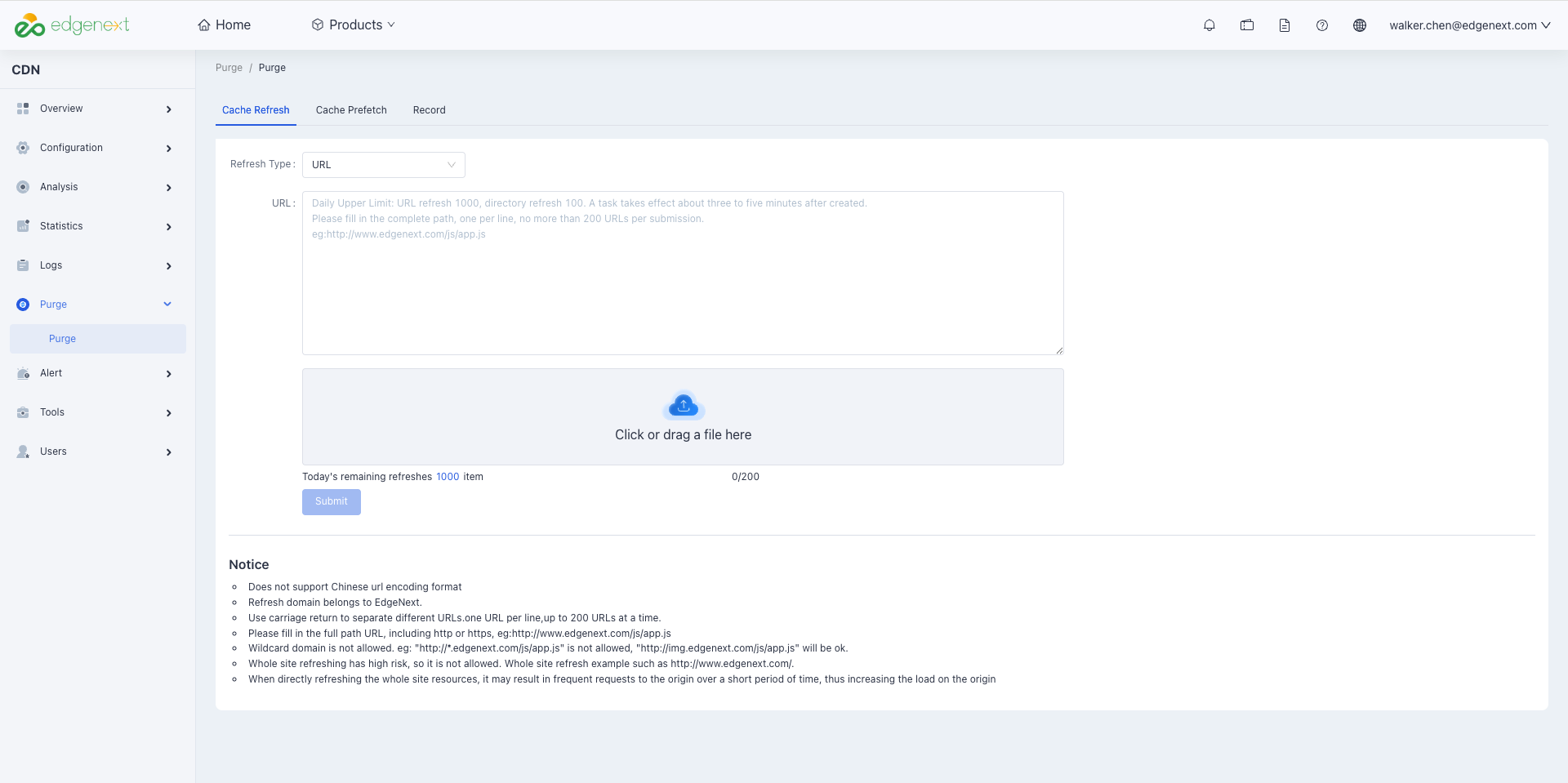
- After filling in the content correctly, click the "Submit" button to perform batch refresh operations.
Important Notes
- Each account has a daily limit of 1000 directory refresh entries, and a single submission limit of 200 directory refresh entries.
- Refresh tasks must include the
http://orhttps://protocol identifier when submitted. - URLs in the format of
http://*.test.com/(wildcard domain format) are not supported for refresh. Even if a wildcard domain is connected for acceleration services, you must submit the corresponding subdomain for refresh. - The domain in the submitted URL must be connected to the EdgeNext CDN acceleration service; otherwise, the submission will fail.
- By default, all nodes across the network are refreshed according to the acceleration region of the domain in the URL at the time of submitting the URL refresh task.
Need help? Contact our support team at support@edgenext.com.
Back to documentation home