

Configure TLS Cipher Suites and Versions
TLS (Transport Layer Security) is the cornerstone of secure communication on the Internet, ensuring data confidentiality and integrity between clients and servers.
Both the TLS protocol version and the cipher suite used determine the level of security and compatibility.
- Protocol Versions define the communication standard. Each version brings new features, security fixes, and performance optimizations.
- Cipher Suites are combinations of encryption algorithms that determine how data is encrypted, authenticated, and protected during transmission.
Prerequisites
Before enabling this feature, make sure that an HTTPS certificate has been successfully configured. For instructions, refer to Configure HTTPS Certificate.
Supported Protocol Versions
| Protocol Version | Description |
|---|---|
| SSLv3 | Contains known critical security vulnerabilities. Only compatible with very old clients. Strongly discouraged. |
| TLSv1.0 | Has known security risks and is no longer compliant with PCI DSS standards. |
| TLSv1.1 | Introduced in 2006, addressed some TLS 1.0 flaws and added extension support. |
| TLSv1.2 | The most widely used version. Offers strong security, improved extensibility, faster cryptographic algorithms, and HTTP/2 support. |
| TLSv1.3 | Simplifies the handshake process, enhances security and performance, encrypts more of the handshake, and supports modern extension APIs. |
Supported Cipher Suites
| Cipher Suites | Description |
|---|---|
| All Cipher Suites (Default) | Recommended for services requiring high compatibility with legacy browsers and relaxed security standards. Included Cipher Suites: ECDHE-ECDSA-CHACHA20-POLY1305 ECDHE-RSA-CHACHA20-POLY1305 ECDHE-ECDSA-AES256-GCM-SHA384 ECDHE-RSA-AES256-GCM-SHA384 ECDHE-ECDSA-AES128-GCM-SHA256 ECDHE-RSA-AES128-GCM-SHA256 DHE-RSA-AES256-GCM-SHA384 DHE-RSA-AES128-GCM-SHA256 EECDH+CHACHA20 EECDH+CHACHA20-draft EECDH+AES256 EECDH+AES128 RSA+AES256 RSA+AES128 EECDH+3DES RSA+3DES |
| Strong Cipher Suites | Recommended for services with low browser compatibility requirements but high security demands. This option disables cipher suites that may have known vulnerabilities. Included Cipher Suites: ECDHE-ECDSA-AES128-GCM-SHA256 ECDHE-RSA-AES128-GCM-SHA256 ECDHE-ECDSA-AES256-GCM-SHA384 ECDHE-RSA-AES256-GCM-SHA384 ECDHE-ECDSA-CHACHA20-POLY1305 ECDHE-RSA-CHACHA20-POLY1305 DHE-RSA-AES128-GCM-SHA256 DHE-RSA-AES256-GCM-SHA384 |
| Custom Cipher Suites | Allows you to manually select specific cipher suites based on your business needs. The following cipher suites are available for selection: ECDHE-ECDSA ECDHE-RSA DHE-RSA EECDH+CHACHA20 EECDH+AES128 EECDH+AES256 RSA+AES128 RSA+AES256 EECDH+3DES RSA+3DES |
Configuration Guide
Scenario 1: Global Domain Configuration
Log in to the Security CDN Console.
In the left-hand navigation panel, go to Speed & Cache > Acceleration to access the Global Acceleration Policy page.
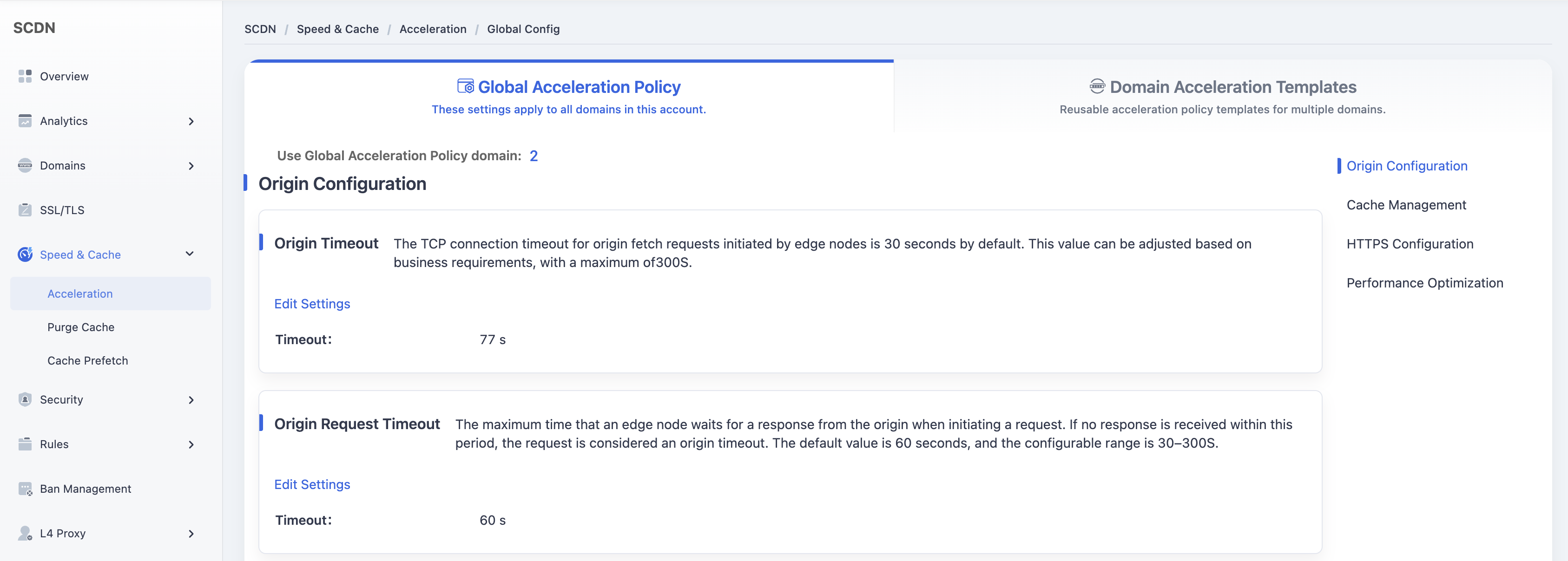
Scroll down and locate the TLS Cipher Suites and Versions module.
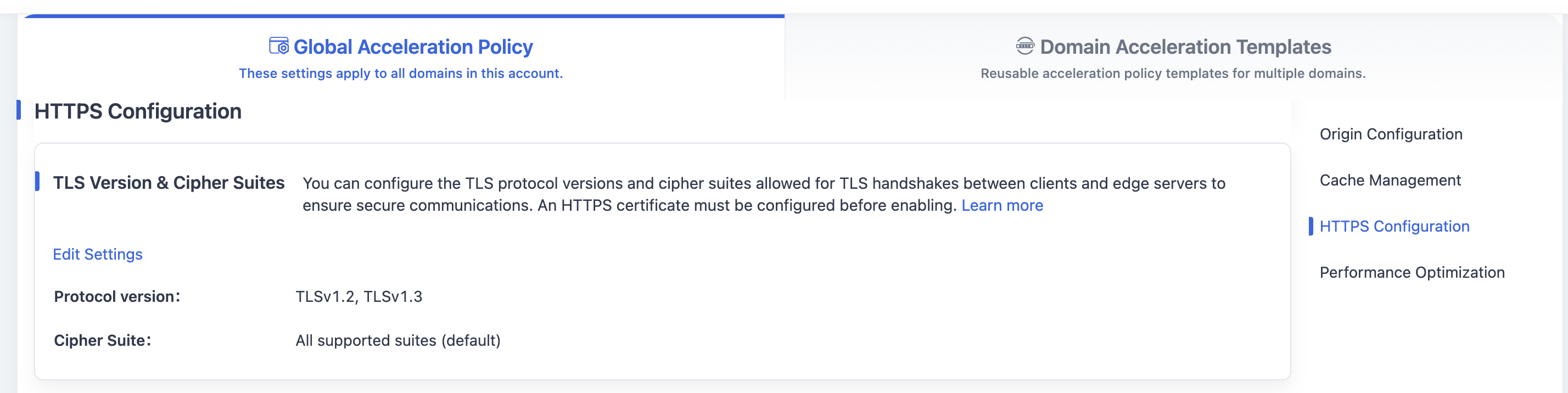
Click Edit Settings to open the settings window.
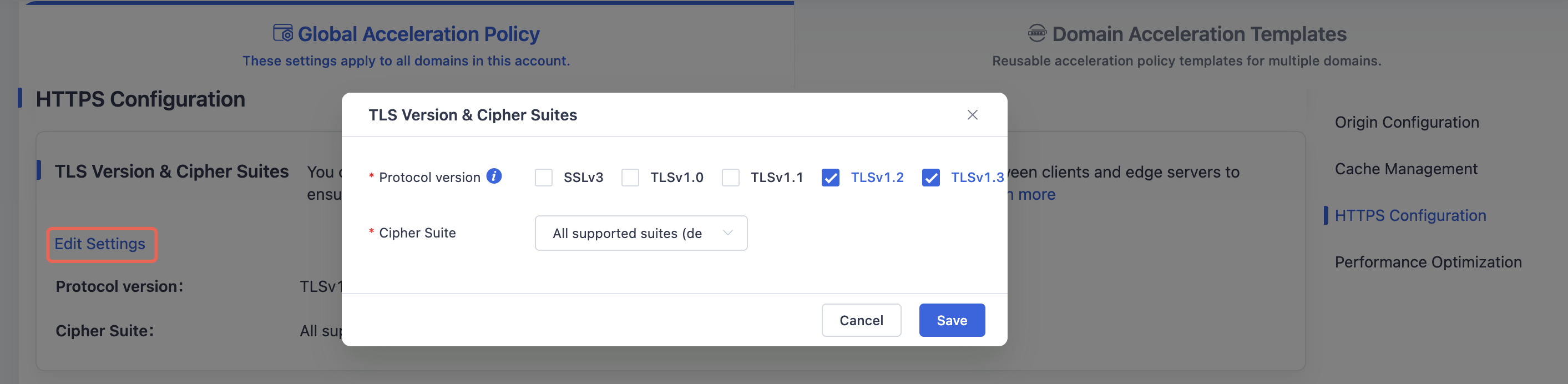
After modifying the supported TLS protocol version and cipher suite configuration, click the Save button to save the TLS protocol version and cipher suite configuration for Global Acceleration Policy.
Scenario 2: Domain Acceleration Template Configuration
Log in to the Security CDN Console.
In the left-hand navigation panel, go to Speed & Cache > Acceleration.
Click Domain Acceleration Template Configuration at the top to open the Template Management page.
Find the desired template, and click Policy Management in the operations column.
Scroll down to the TLS Cipher Suites and Versions module.

Click Edit Settings to open the settings window.
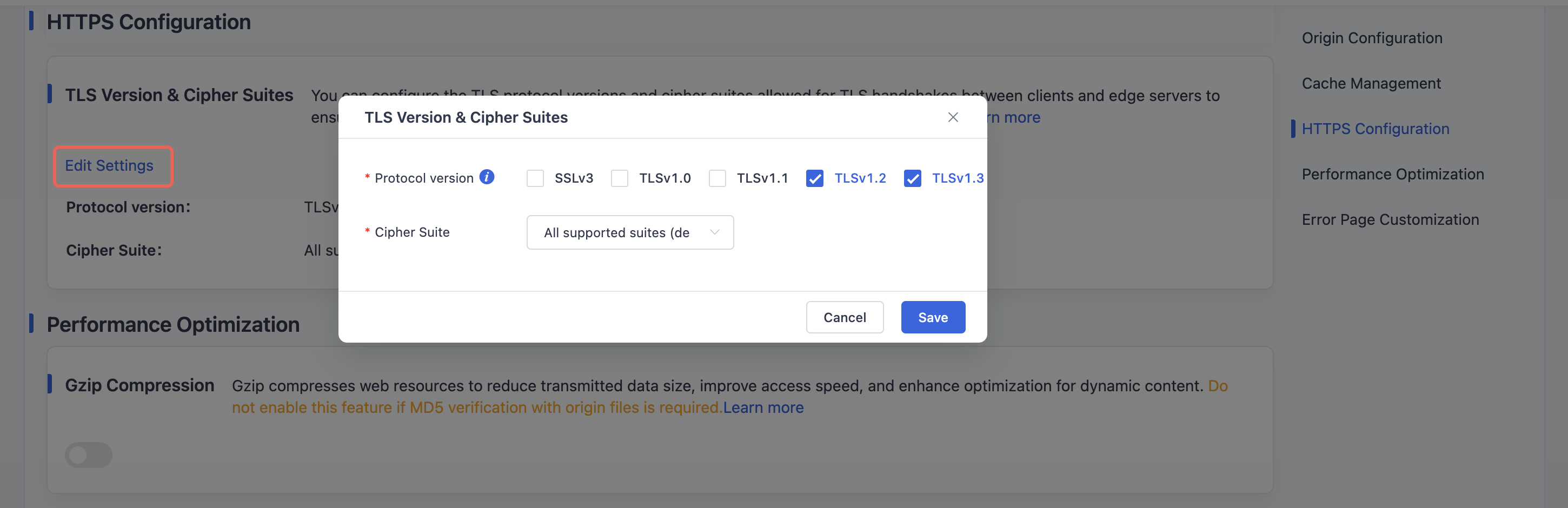
After modifying the supported TLS protocol versions and cipher suites, click Save to apply and save the TLS configuration for the template.
Need help? Contact our support team at support@edgenext.com.
Back to documentation home