

Regional Blocking
Regional Blocking allows users to control access based on the geographic location (country or region) of incoming requests. By configuring blacklists or whitelists, users can precisely manage access permissions for different regions and further set effective time periods for more flexible control strategies.
Feature Overview: Exclusive Whitelist or Blacklist Mode
Mode Selection
When configuring regional blocking rules, users can only enable one mode at a time—either Blacklist or Whitelist.
Blacklist Mode:Blocks access requests originating from the selected regions; requests from other regions are allowed.
Whitelist Mode:Only allows access requests from the selected regions; requests from all other regions are denied.
Precise Time Control
Each regional blocking rule supports custom time-based activation, allowing configuration by:
Day of the week (Monday to Sunday)
Time period (from 00:00 to 23:59)
This enables highly flexible scheduling of access control rules.
Configuration Guide
Log in to the Security CDN Console.
In the left navigation panel, go to Security > Web Security.
On the Global Security Policy page, scroll down to the Access Control > Regional Blocking module.

Toggle the switch to open the settings dialog.
In the settings dialog:
- Select either Blacklist Mode or Whitelist Mode.
- Choose the applicable regions.
- (Optional) Enable and configure time control by selecting specific weekdays and time periods.
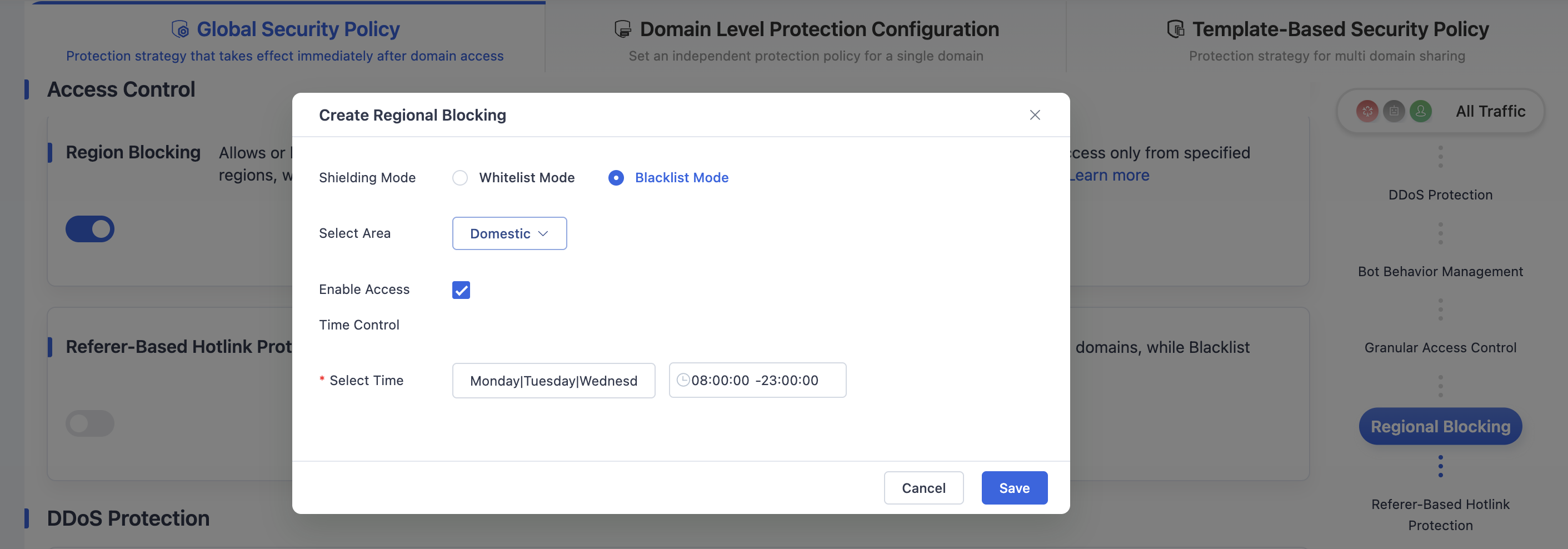
Once configuration is complete, click Save to save the Regional Blocking policy under the global security settings.
Need help? Contact our support team at support@edgenext.com.
Back to documentation home