

Granular Access Control for L4 Proxy
Granular Access Control for Layer 4 Proxy supports flexible policy configuration based on multiple dimensions, including IP addresses, geographic locations, packet headers, and TCP response messages. It helps users effectively identify and manage different types of incoming traffic, mitigate malicious access, prevent abuse, and enhance overall security protection.
Access Control Matching Types and Logic
| Match Fields | Description | Match Logic |
|---|---|---|
| IP | Client IP accessing the edge node, i.e., $remote_addr. Supports IPv4, IPv6, and CIDR notation (e.g., 1.1.1.0/24). | Equal to Does not Equal to In IP list Not in IP list In the last seven days of the white list Not on the white list in the last seven days |
| Request Region | Geographic region of the requester accessing the edge node. Supports continent, region, country, and province-level granularity. | Belongs Does not belong |
| IP Type | Client IP attributes, such as search engine, partner, IDC, botnet, etc. | Equal to Does not Equal to |
| Header | First TCP packet content, supports binary or string pattern matching. | Contains Does not Contain String Contains String does not Contain |
| IP Request Frequency | Request frequency from the client. | Larger than X Second Y Times |
| TCP Port | Server port of the edge node being requested, e.g., 80,443. | Equal to Does not Equal to |
| TCP Connection Type | Idle connections or slow connections. | Equal to Does not Equal to |
| TCP First Package Size | Size of the first packet received in the TCP session. | Larger than Smaller than Equal to Does not Equal to |
| TCP Response Packet Size | Size of the first packet received in the TCP session. | Larger than Smaller than Equal to Does not Equal to |
| Request Protocol | Does it use the TCP protocol? | Belongs Does not belong |
2.Operation Method
| Operation Method | Description |
|---|---|
| Block | Intercept the matching request and directly return an error page. |
| Ban | In addition to intercepting the matching request, the source will be added to a blocklist and denied access for a certain period of time. |
| Release | Explicitly allow the matching request to pass; the system will skip related security policy checks. |
| Observation | The request will still match the rule, but no interception will be performed—only a log entry will be recorded. |
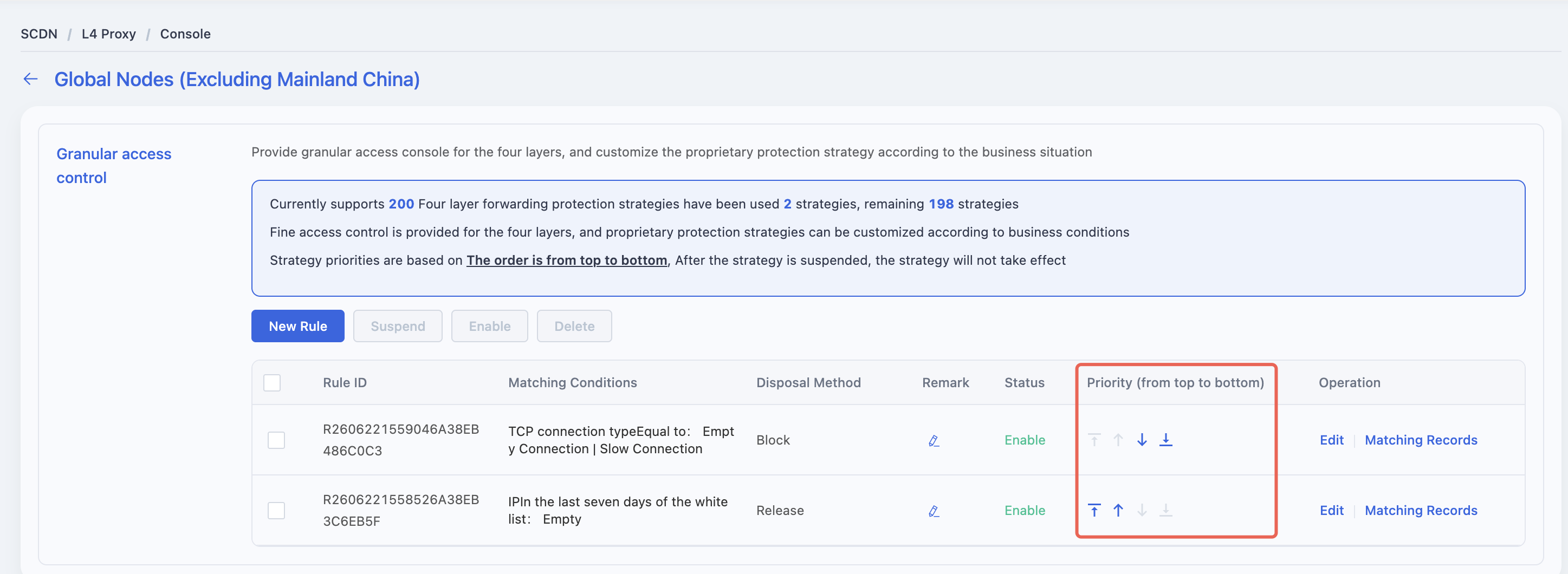
3. Rule Priority
- Rules are matched from top to bottom based on their order in the list. The first matched rule takes effect.
- Newly created rules are placed at the top by default and have the highest priority.
- You can manually adjust the rule order to modify their execution priority.
- Paused rules are skipped during the matching process and will not be executed.
4. How to Add a Rule
Log in to the Security CDN Console.
In the left navigation panel, select L4 Proxy, then click Proxy Management to enter the management page.
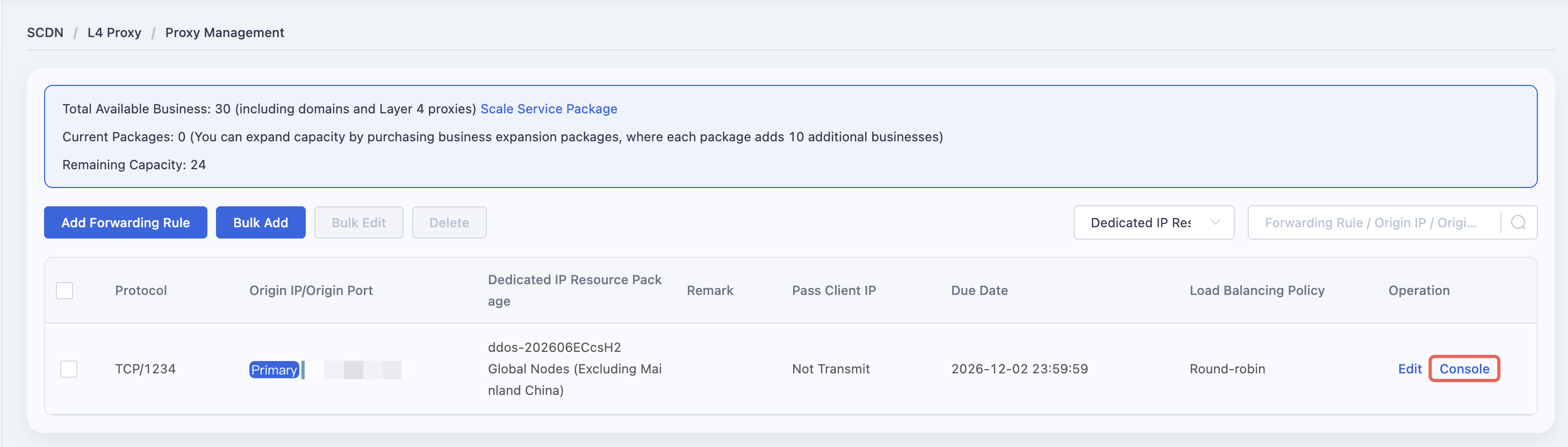
On the L4 Proxy Management page, find the L4 forwarding rule where you want to configure Granular Access Control, then click Console in the Actions column to access the rule console.
In the Granular Access Control section, click the Add Rule button to open the rule creation dialog.
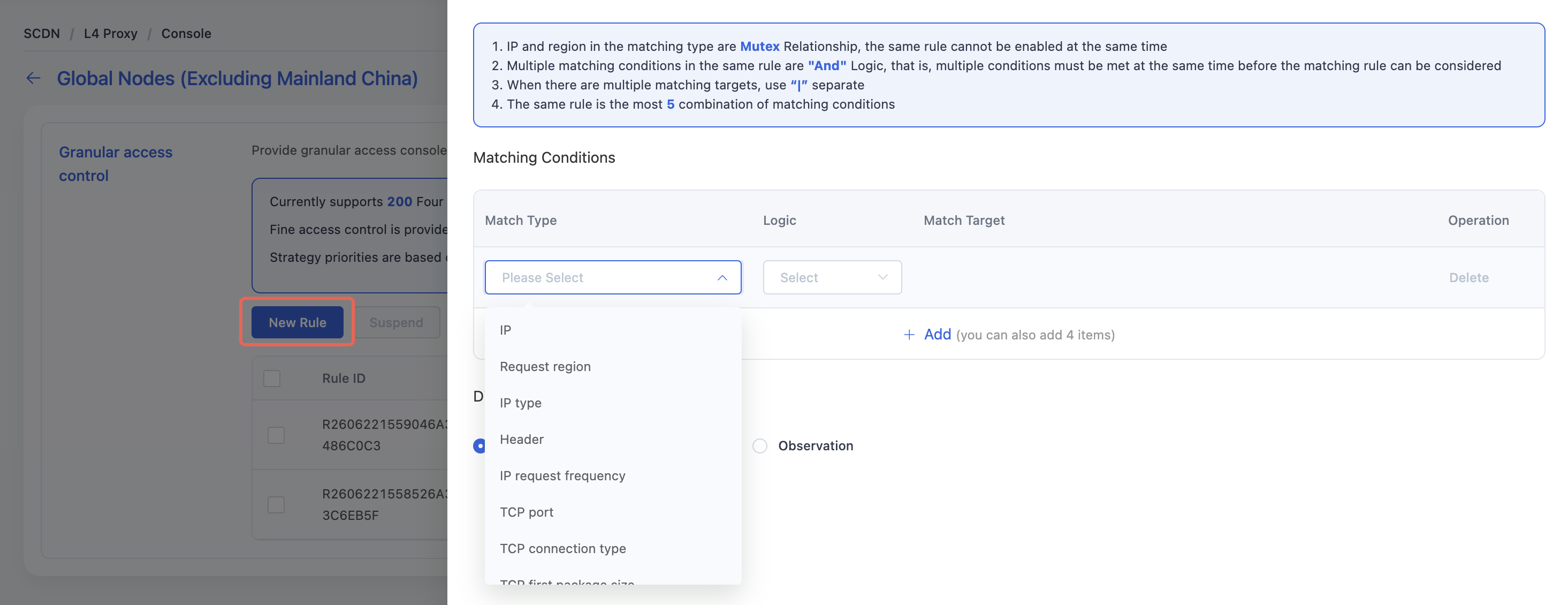
Configure the Matching Conditions and Disposal Method, then click Save to complete the rule setup.
Need help? Contact our support team at support@edgenext.com.
Back to documentation home