

EdgeNext OSS API User Guide
EdgeNext OSS API and S3 Client Usage Guide
S3 Client Usage
S3 Browser
Introduction
S3 Browser is a graphical file management tool for the Windows platform, designed for browsing and managing cloud-based object storage resources. It supports intuitive file operations such as uploading, downloading, deleting, copying, moving, and renaming. The tool aims to provide users with an efficient and user-friendly experience for managing cloud storage.
Download and Installation
- Download URL: S3 Browser
- Installation: Click "Next" throughout the installation of
s3browser-7-6-9.exe.
Configuration
On first use, configure the storage account by providing the storage address and authentication information (Access Key and Secret Key).
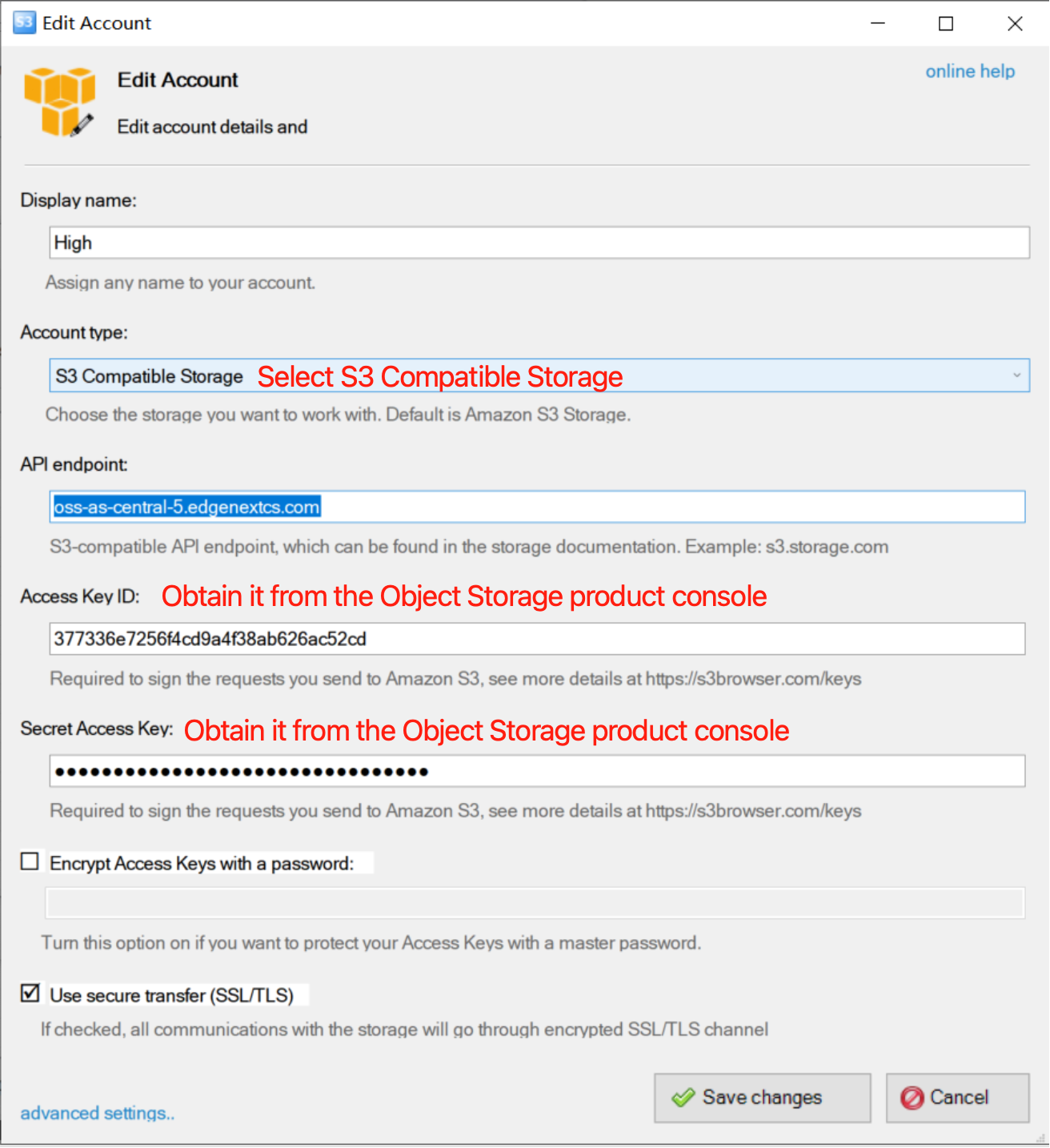
After saving and creating, you will be able to view the storage content and perform operations.
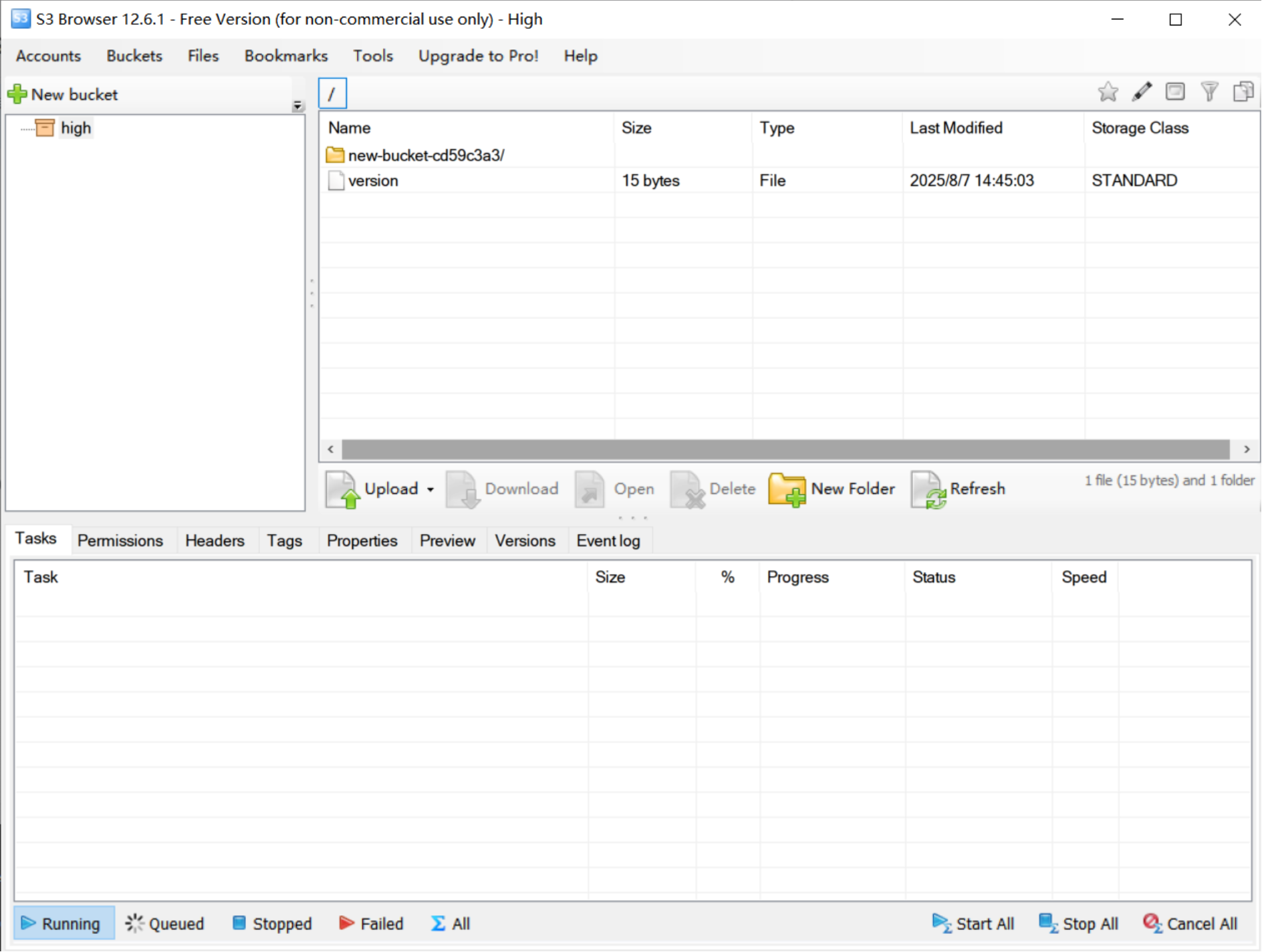
Usage
- Upload & Download:
Upload single files or entire directories from local storage.
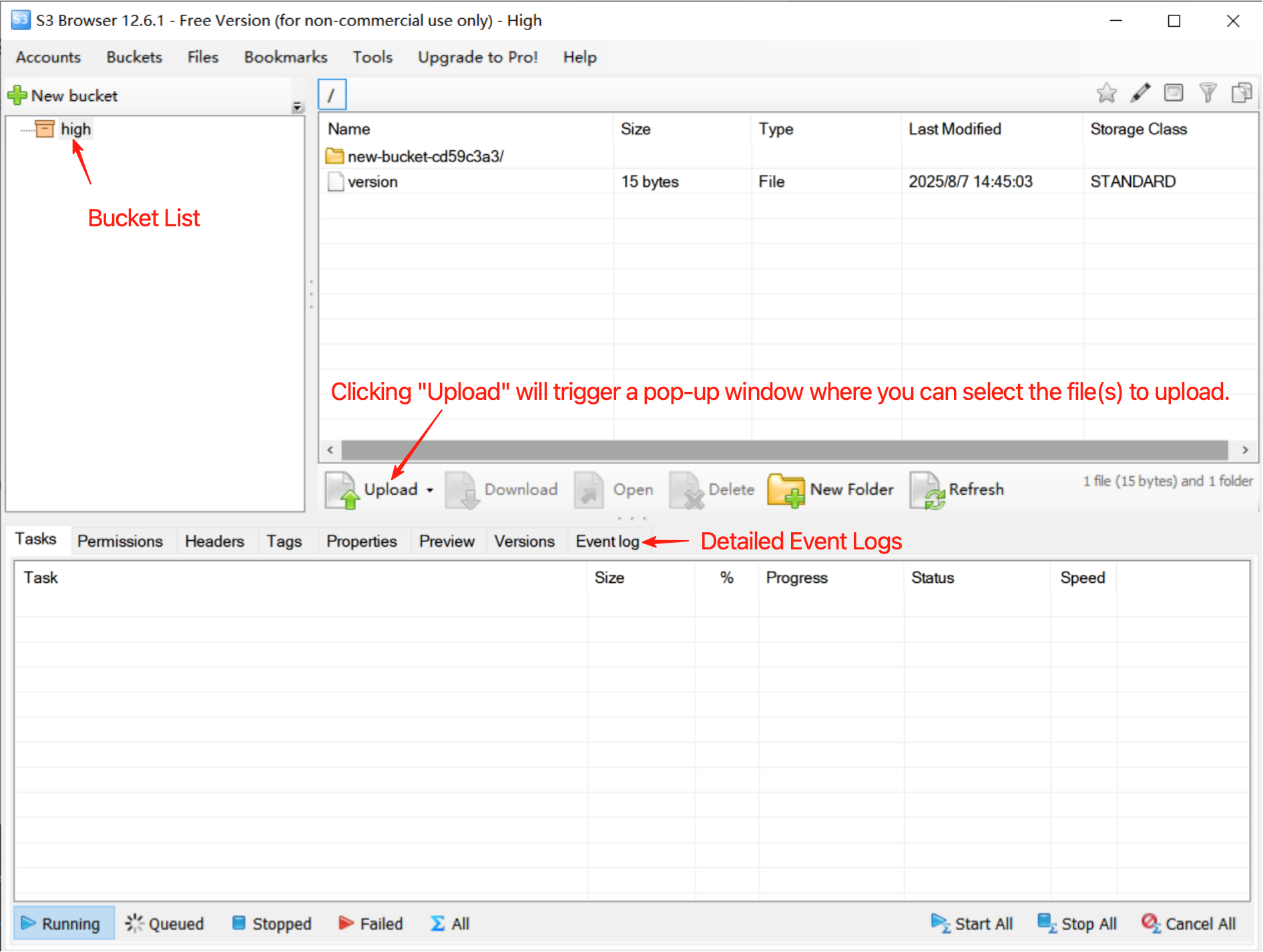
Select files/directories and click "Download" to download them.
- Account & Bucket Management:
- Click "Manage accounts" to edit or delete account configurations.
- Use the "Buckets" option to create, delete, or refresh Buckets.
S3cmd
Introduction
S3cmd is a command-line tool for managing files in object storage services that support the S3 protocol. It provides capabilities such as uploading, downloading, syncing files, setting access permissions, and encryption. It’s often used for backups, automation scripts, and general object storage management.
Installation
- On Linux, install the epel repository first.
- Install Command:
yum install s3cmd
Configuration
Configure authentication (Access Key/Secret Key), storage address, and Bucket:
cat << EOF > ~/.s3cfg
access_key = YOUR_ACCESS_KEY
secret_key = YOUR_SECRET_KEY
host_base = <Endpoint>
host_bucket = %(bucket)
use_https = False
EOF
- Troubleshooting:
- If
s3cmdfails with-bash: /usr/bin/s3cmd: /usr/bin/python2: bad interpreter: No such file or directory, modify the Python version:- Edit
/usr/bin/s3cmdand change#!/usr/bin/pythonto#!/usr/bin/python2.7.
- Edit
- If
Common Commands
- List Buckets:
s3cmd ls - Create Bucket:
s3cmd mb s3://$bucket_name - List Bucket Objects:
s3cmd ls s3://$bucket_name - Upload File:
- Single file:
s3cmd put $local_file s3://$bucket/$name - Directory:
s3cmd put --recursive dir1 dir2 s3://$bucket_name/somewhere/ - Sync:
s3cmd sync dir1 dir2 s3://public.s3tools.org/somewhere/
- Single file:
- Download File:
s3cmd get s3://$bucket/$object - Delete File:
s3cmd del s3://$bucket_name/$object - Help:
s3cmd --help
EdgeNext OSS API
Overview
EdgeNext OSS (Object Storage Service) is a cloud storage service that offers massive, secure, low-cost, and highly reliable storage. You can use the simple REST interfaces provided in this document to upload and download data at any time, from any location, and on any internet-enabled device.
Terminology
| Type | Description |
|---|---|
| Bucket | A bucket is a container for storing objects (Object), and all objects must belong to a bucket. |
| Object | An object is the basic unit of data storage in OSS, also known as a file in OSS. An object consists of metadata (Object Meta), user data (Data), and a filename (Key). Objects are uniquely identified by a Key within the bucket. |
| Region | A region indicates the physical location of the OSS data center. You can choose the region for data storage based on factors such as cost and request source. |
| Endpoint | The endpoint is the access domain name for OSS external services. OSS provides services in the form of HTTP RESTful APIs, and different domains are required when accessing different regions. The domains needed for internal and external access to the same region are also different. |
| AccessKey | AccessKey, abbreviated as AK, refers to the AccessKeyId and AccessKeySecret used in access authentication. OSS verifies the identity of the sender of a request by using symmetric encryption with AccessKeyId and AccessKeySecret. AccessKeyId is used to identify the user, and AccessKeySecret is the key used by the user to encrypt the signature string and by OSS to verify the signature string. AccessKeySecret must be kept confidential. |
Compatible Signature Authentication
Compatible with the latest AWS Signature Version 4. For the signature method, see Authenticating Requests - AWS Signature Version 4.
API Examples
Service Operations
ListBuckets
Request
- HTTP Method: GET
- Endpoint:
https://<Endpoint>/ - Required Request Headers:
- Authorization:signature credentials
- Date: Request time
- Host: The S3 service endpoint address
Response
- Successful Response: Returns a list of buckets in XML format
<?xml version="1.0" encoding="UTF-8"?>
<ListAllMyBucketsResult xmlns="http://s3.amazonaws.com/doc/2006-03-01/">
    <Owner>
        <ID>User Uid</ID>
        <DisplayName>Display Name</DisplayName>
    </Owner>
    <Buckets>
        <Bucket>
            <Name>example-bucket-01</Name>
            <CreationDate>timestamp</CreationDate>
        </Bucket>
        <Bucket>
            <Name>example-bucket-02</Name>
            <CreationDate>timestamp</CreationDate>
        </Bucket>
    </Buckets>
</ListAllMyBucketsResult>
Request Example
awscurl --service s3 --access_key <USER-ACCESS-KEY> --secret_key <USER-SECRET-KEY> https://<Endpoint>/
Bucket Operations
CreateBucket
Request
- HTTP Method: PUT
- Endpoint:
https://<Bucket_Name>.<Endpoint>/ - Required Request Headers:
- Authorization:signature credentials
- Date: Request time
- Host: The S3 service endpoint address
Response
- Successful Response
Request Example
awscurl --service s3 --access_key <USER-ACCESS-KEY> --secret_key <USER-SECRET-KEY> -X PUT https://<Bucket_Name>.<Endpoint>/
ListObjects
Request
- HTTP Method: GET
- Endpoint:
https://<Bucket_Name>.<Endpoint> - Required Request Headers:
- Authorization:signature credentials
- Date: Request time
- Host: The S3 service endpoint address
Response
- Successful Response: Returns a list of objects in XML format
<?xml version="1.0" encoding="UTF-8"?>
<ListBucketResult xmlns="http://s3.amazonaws.com/doc/2006-03-01/">
    <Name>Bucket Name</Name>
    <Prefix></Prefix>
    <MaxKeys>1000</MaxKeys>
    <IsTruncated>false</IsTruncated>
    <Contents>
        <Key>example-object-01</Key>
        <LastModified>timestamp</LastModified>
        <ETag>string</ETag>
        <Size>long</Size>
        <StorageClass>string</StorageClass>
        <Owner>
            <ID>string</ID>
            <DisplayName>string</DisplayName>
        </Owner>
        <Type>Normal</Type>
    </Contents>
    <Contents>
        <Key>example-object-02</Key>
        <LastModified>timestamp</LastModified>
        <ETag>string</ETag>
        <Size>long</Size>
        <StorageClass>string</StorageClass>
        <Owner>
            <ID>string</ID>
            <DisplayName>string</DisplayName>
        </Owner>
        <Type>Normal</Type>
    </Contents>
    <Marker></Marker>
</ListBucketResult>
Request Example
awscurl --service s3 --access_key <USER-ACCESS-KEY> --secret_key <USER-SECRET-KEY> https://<Bucket_Name>.<Endpoint>
HeadBucket
Request
- HTTP Method: HEAD
- Endpoint:
https://<Bucket_Name>.<Endpoint>/ - Required Request Headers:
- Authorization:signature credentials
- Date: Request time
- Host: The S3 service endpoint address
Response
- Successful Response
HTTP/1.1 200 OK
Date: Fri, 27 Jun 2025 08:42:24 GMT
Connection: keep-alive
Server: nginx/1.25.2
Content-Type: application/xml
Transfer-Encoding: chunked
x-amz-request-id: <string>
x-cc-via: i2289163_c27113[M,359]
Request Example
awscurl --service s3 --access_key <USER-ACCESS-KEY> --secret_key <USER-SECRET-KEY> -i https://<Bucket_Name>.<Endpoint>
DeleteBucket
Request
- HTTP Method: DELETE
- Endpoint:
https://<Bucket_Name>.<Endpoint>/ - Required Request Headers:
- Authorization:signature credentials
- Date: Request time
- Host: The S3 service endpoint address
Response
- Successful Response
Request Example
awscurl --service s3 --access_key <USER-ACCESS-KEY> --secret_key <USER-SECRET-KEY> -X DELETE https://<Bucket_Name>.<Endpoint>
GetBucketPolicy
Request
- HTTP Method: GET
- Endpoint:
https://<Bucket_Name>.<Endpoint>/?policy - Required Request Headers:
- Authorization:signature credentials
- Date: Request time
- Host: The S3 service endpoint address
Response
- Successful Response: Returns the policy in JSON format
{
  "Statement": [
    {
      "Sid": "PUBLIC_READ_WRITE",
      "Effect": "Allow",
      "Principal": "*",
      "Action": ["s3:ListBucket", "s3:GetObject", "s3:PutObject", "s3:DeleteObject"]
    }
  ]
}
Request Example
awscurl --service s3 --access_key <USER-ACCESS-KEY> --secret_key <USER-SECRET-KEY> https://<Bucket_Name>.<Endpoint>/?policy
PutBucketPolicy
Request
- HTTP Method: PUT
- Endpoint:
https://<Bucket_Name>.<Endpoint>/?policy - Required Request Headers:
- Authorization:signature credentials
- Date: Request time
- Host: The S3 service endpoint address
- Policy Format:
{
  "Statement": [
    {
      "Sid": "PUBLIC_ALL",
      "Effect": "Allow",
      "Principal": "*",
      "Action": ["s3:*"]
    }
  ]
}
Response
- Successful Response
Request Example
cat > public_all.json << EOF
{
  "Statement": [
    {
      "Sid": "PUBLIC_READ_WRITE",
      "Effect": "Allow",
      "Principal": "*",
      "Action": ["s3:*"]
    }
  ]
}
EOF
awscurl --service s3 --access_key <USER-ACCESS-KEY> --secret_key <USER-SECRET-KEY> -X PUT -d "@public_all.json" https://<Bucket_Name>.<Endpoint>/?policy
DeleteBucketPolicy
Request
- HTTP Method: DELETE
- Endpoint:
https://<Bucket_Name>.<Endpoint>/?policy - Required Request Headers:
- Authorization:signature credentials
- Date: Request time
- Host: The S3 service endpoint address
Response
- Successful Response
Request Example
awscurl --service s3 --access_key <USER-ACCESS-KEY> --secret_key <USER-SECRET-KEY> -X DELETE https://<Bucket_Name>.<Endpoint>/?policy
Object Operations
PutObject
Request
- HTTP Method: PUT
- Endpoint:
https://<Bucket_Name>.<Endpoint>/<Object_Name> - Required Request Headers:
- Authorization:signature credentials
- Date: Request time
- Host: The S3 service endpoint address
Response
- Successful Response
Request Example
awscurl --service s3 --access_key <USER-ACCESS-KEY> --secret_key <USER-SECRET-KEY> -X PUT -d "@public_all.json" https://<Bucket_Name>.<Endpoint>/<Object_Name>
GetObject
Request
- HTTP Method: GET
- Endpoint:
https://<Bucket_Name>.<Endpoint>/<Object_Name> - Required Request Headers:
- Authorization:signature credentials
- Date: Request time
- Host: The S3 service endpoint address
Response
- Successful Response
Request Example
awscurl --service s3 --access_key <USER-ACCESS-KEY> --secret_key <USER-SECRET-KEY> https://<Bucket_Name>.<Endpoint>/<Object_Name>
HeadObject
Request
- HTTP Method: HEAD
- Endpoint:
https://<Bucket_Name>.<Endpoint>/<Object_Name> - Required Request Headers:
- Authorization:signature credentials
- Date: Request time
- Host: The S3 service endpoint address
Response
- Successful Response
HTTP/1.1 200 OK
Server: nginx/1.25.2
Date: Thu, 05 Jun 2025 08:00:16 GMT
Content-Type: binary/octet-stream
Content-Length: 208
Content-Type: application/json
Connection: keep-alive
Accept-Ranges: bytes
Last-Modified: Thu, 05 Jun 2025 07:47:38 GMT
x-rgw-object-type: Normal
ETag: "2d4cb48137a5db1dae392a9bf3171055"
x-amz-request-id: tx0000052a343426e9dd415-0068414e90-462c-oss-as-central-5
Vary: Accept-Encoding
x-cc-via: i2315853_c27597[M,360]
Request Example
awscurl --service s3 --access_key <USER-ACCESS-KEY> --secret_key <USER-SECRET-KEY> -i https://<Bucket_Name>.<Endpoint>/<Object_Name>
DeleteObject
Request
- HTTP Method: DELETE
- Endpoint:
https://<Bucket_Name>.<Endpoint>/<Object_Name> - Required Request Headers:
- Authorization:signature credentials
- Date: Request time
- Host: The S3 service endpoint address
Response
- Successful Response
Request Example
awscurl --service s3 --access_key <USER-ACCESS-KEY> --secret_key <USER-SECRET-KEY> -X DELETE https://<Bucket_Name>.<Endpoint>/<Object_Name>
DeleteObjects
Request
- HTTP Method: POST
- Endpoint:
https://<Bucket_Name>.<Endpoint>/?delete - Required Request Headers:
- Authorization:signature credentials
- Date: Request time
- Host: The S3 service endpoint address
Response
- Successful Response
<?xml version="1.0" encoding="UTF-8"?>
<DeleteResult xmlns="http://s3.amazonaws.com/doc/2006-03-01/">
    <Deleted>
        <Key>example-object-01</Key>
    </Deleted>
    <Deleted>
        <Key>example-object-02</Key>
    </Deleted>
</DeleteResult>
Request Example
cat > delete.xml <<EOF
<?xml version="1.0" encoding="UTF-8"?>
<Delete>
  <Object><Key>example-object-01</Key></Object>
  <Object><Key>example-object-02</Key></Object>
</Delete>
EOF
awscurl --service s3 --access_key <USER-ACCESS-KEY> --secret_key <USER-SECRET-KEY> -X POST -d "@delete.xml" https://<Bucket_Name>.<Endpoint>/?delete
CopyObject
Request
- HTTP Method: PUT
- Endpoint:
https://<Bucket_Name>.<Endpoint>/<Dist_Object_Name> - Required Request Headers:
- Authorization:signature credentials
- Date: Request time
- Host: The S3 service endpoint address
Response
- Successful Response
<?xml version="1.0" encoding="UTF-8"?>
<CopyObjectResult xmlns="http://s3.amazonaws.com/doc/2006-03-01/">
    <LastModified>timestamp</LastModified>
    <ETag>string</ETag>
</CopyObjectResult>
Request Example
awscurl --service s3 --access_key <USER-ACCESS-KEY> --secret_key <USER-SECRET-KEY> -X PUT -H "x-amz-copy-source: /<Bucket_Name>/<Src_Object_Name>" https://<Bucket_Name>.<Endpoint>/<Object_Name>
Need help? Contact our support team at support@edgenext.com.
Back to documentation home